


Participating Frequently
January 14, 2025
Open for Voting

Right Click Custom Menu Suggestion

  • January 14, 2025
  • 2 replies
  • 223 views

Someone else suggested this back in 2017, but no traction. Note how many menu items I never use on the layer right click:
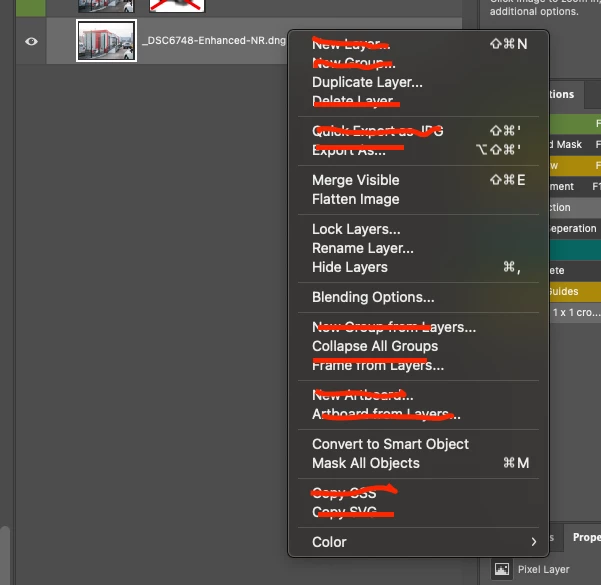
I've NEVER used those options. Can we vote for the ability to customize it the same as the application menus? I'm getting old and my eyes are getting worse, so I have trouble seeing the options. 


It would be great too if the customize interface would show a preview of the current menu you are modifiying. I like to put colours on my most frequently used items.

2 replies

Participating Frequently
January 15, 2025

Thanks for those suggestions. I'm aware of those options. I've just tried to declutter my interface as much as possible. Having the ability to add colors and remove items was a fantastic upgrade when they started that. I just find that right click menu bloated and not customised. Perhaps it isn't possible, but the reason why professionals love photoshop IS the ability to customise.


Just to understand how much I like to customise, the colors to the right of the menu in the screenshot are all my actions. That wasn't enough for me so I got a Logitech MX Creative Console. I like buttons and customisation 🙂 I may be a bit of an oddball, but I begged for years to get "open as smart object layers" added to Lightroom Classic for YEARS until they finally did.

Myra Ferguson
Community Expert
Community Expert
January 15, 2025

There are a couple of options that you can currently use to access those commands more easily.

  • Use keyboard shortcuts - many of the commands in the contextual menu already have keyboard shortcuts. For many of the others, you can also find the commands in the Layer menu. Because they are in the Layer menu, you can use Edit > Keyboard Shortcuts... The in the Keyboard Shortcuts and Menus dialog, you can set Shortcuts for Application Menus.
  •  Create actions - For a command such as Color where you set the color of the layer, you can set up an action. The Actions panel can also be set to display in Button Mode where you can click on your action to run it. These buttons can also be set to a specific color by selecting the action, going to the Actions panel menu (the hamburger menu in the upper right of the panel), and selecting Action Options...