


Participating Frequently
September 11, 2026
Open for Voting

Screen Mode on Mac - Consolidate Traffic Light and Application name to save vertical space

  • September 11, 2026
  • 2 replies
  • 18 views

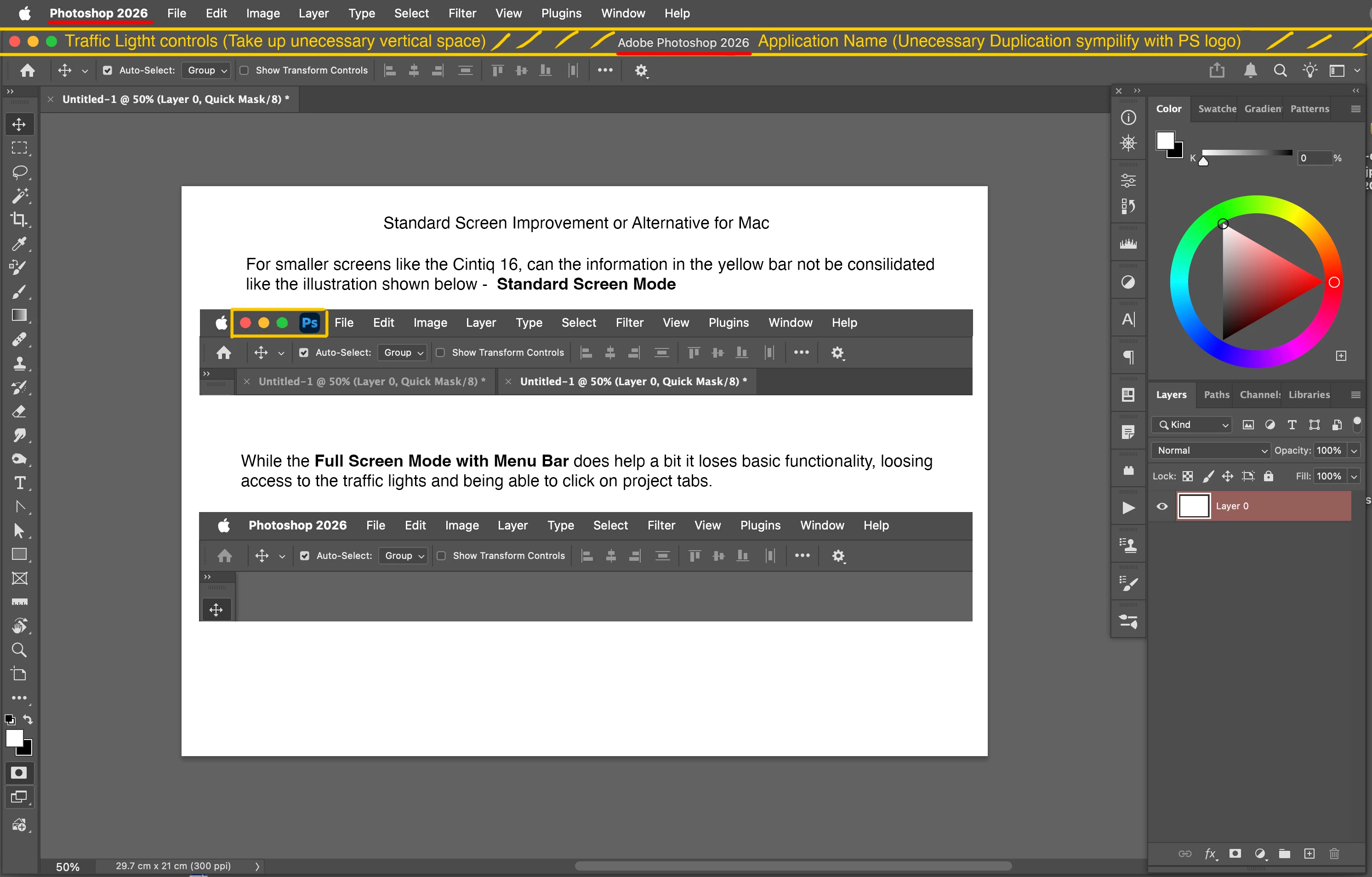
I’ve just purchased a small Cintiq 16 and I’ve noticed that on my Mac I am loosing quite a bit of vertical space to an unnecessary bar of information. The PS application name is duplicated here along with the Mac traffic light system window buttons. I have attached a visual of what I propose, which in my opinion is far more focussed. I would be most grateful if the Photoshop development team (wider team) could look at this as either an update or an alternative Screen Mode. 
 

    2 replies

    Jeff Arola
    Community Expert
    Community Expert
    September 11, 2026

    You could try turning off the Photoshop Application Frame by going to Window>Application Frame.


    Participating Frequently
    September 11, 2026

    Thanks very much Jeff, I will certainly look at your suggestion tomorrow. I did contacted Adobe directly earlier and I hope this will be addressed by the development team. By consolidating the traffic light and Application logo (as I suggested), it will retain the same functionality and get rid of an underused bar. 3 rather than 4 bars    Menu Bar > Context Bar and Tabs Bar