


Manniac
Known Participant
January 2, 2023
Open for Voting

Suggestion: Secondary Color Correction with Adjustment Layers

  • January 2, 2023
  • 7 replies
  • 1215 views

There is no procedural Secondary Color Correction for Adjustment Layers in Photoshop, like we know it from Premiere Pro:
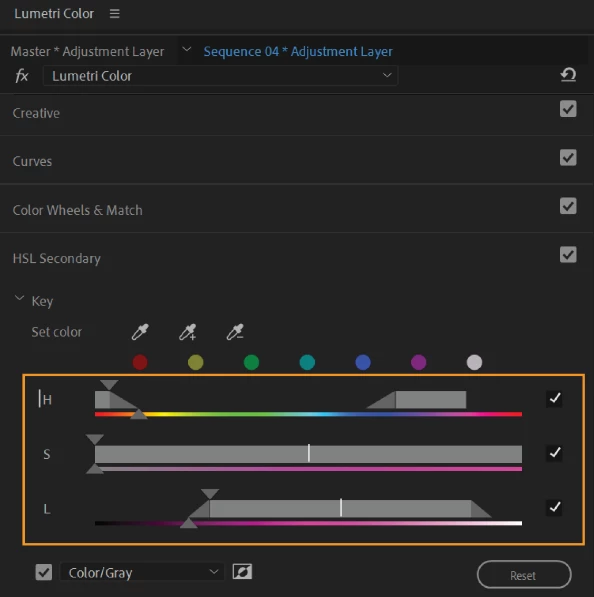
 

For years now I use different tricks to achieve secondary color correction using the mask from "color range", but this is way too imprecise and results in a static mask. It does not dynamically change when the color below changes.

So I suggest the following:
Add "secondary color correction" to the blending options (of adjustment layers). That way one can limit the effect of curves or levels to a specific range of hue, saturation and brightness values in a way that can currently not be achieved otherwise.
- "color range" is not the same because it is not dynamic.
- "hue satuaration" is not the same, because it can only affect hue ranges, but not brightness and saturation, and also it can not achieve the effect of RGB curves.
- "selective colors" is not the same, because it also has no ranges, but is fixed to specific hues and you can not achieve the effect of RGB curves with it.

7 replies

Known Participant
January 5, 2023

In PS, the tool "select > color range" and "sampled colors" in use, is doing near exactly that internally.
When you use the sampler (+ / -), it corrects the "internal sliders" of each componant (HSL) in a basic way, and in a way we can't controle enough.
The tool asked in this topic is something I'm waiting too since years on my side too. Because having control of every steps of "colors selection" with HSL, is a way to have a controlled "color correction" on the image, and this kind of  "color selection" precision is nowhere in PS.
This kind of tool can be helpfull not only to color correct precisely, but it can be a usefull tool to make true "color selection" (with the three component so)

D Fosse
Community Expert
Community Expert
January 3, 2023

Just speaking for myself. This is not something I want or need. I'm not trying to kill your idea, by all means - there are lots of tools in Photoshop I never touch.


You misunderstand when you say that Blend If lets you work on color ranges. That's not what it does. You work in color channels, and that's a completely different thing. You may need to work the red channel to correct a cyan color. The point with Blend If is that it lets you work with surgical precision, right down to the very anatomy of the file.


For the type of work that I do, there's no way this could achieve the level of precision I would require. It would always be quick-and-dirty. That's fine for some purposes; but not my purposes.


As Ivan Zayats said above, this is essential for video, where you can't go in and mask each frame. In video, you need something dynamic that moves with the content. That's why it's in Premiere Pro.


Manniac
ManniacAuthor
Known Participant
January 3, 2023

You misunderstand the power of HLS vs RGB selection as in "Blend if".

In "rgb blend if" you can choose red, green, blue ranges - but ONLY that.

in hls you can choose a specific hue, saturation and bightness. This way you can select only highly saturated bright greens, while low saturated bright greens are not selected. you can select bright blue-greenish sky, while leaving alone a bright blue t-shirt. in a picture full of red tones you can be very precise about the red tones, their brightness and shift towards greens or blues and their saturation - so you can differentiate between a saturated red shirt and a red chair with similar brightness, but less saturation.
This is absolutely not possible with rgb blendif. Right now there is no way in photoshop to make a selection based on an hls range. This is a standard in video editing and for photo editing it would be a life saver. At least for me.

Ivan Zajats
Inspiring
January 3, 2023

@D Fosse yep, though it looks fancy, I can't imagine where I'd need this dynamic color masks (except video)

D Fosse
Community Expert
Community Expert
January 3, 2023

I get the idea, but an adjustment layer + Blend If (per channel) achieves everything I have ever needed to do, so for me this would be a solution in search of a problem. In particular, the choice between "this layer" and "underlying layer" adds flexibility that I don't see this having.


It's risky to change people's habits and muscle memory when the functionality is already there. I can't see that it would do anything that you can't already do.


And while I could also agree that the Blend If interface is "terrible" - it still does what it needs to do. So again, the cost of changing it would have to be weighed against any benefits.

Manniac
ManniacAuthor
Known Participant
January 3, 2023

Kind of like blend if.. but for hls colors, not rgb.

Also the interface for blend if is terrible. So, Adobe if you listen, please copy Premiere's interface instead 🙂

Ivan Zajats
Inspiring
January 2, 2023

so, it's smth like the Blend if, but for Colors? sounds interesting, but too exotic