


January 20, 2026
Open for Voting

Variable Font Settings on Contextual Task Bar

  • January 20, 2026
  • 2 replies
  • 36 views

When working with variable fonts in Photoshop, adjusting font properties such as weight, width, slant, and optical size currently requires opening the full Properties panel. This interrupts workflow, especially when working in full screen or distraction-free modes.

I propose adding a dedicated Variable Font settings button directly to the contextual text task bar. This would allow users to quickly access and adjust variable font axes without leaving the canvas or opening side panels.

Currently, the More Options menu on the contextual bar only includes spacing, bold, italic, and underline controls. Expanding this to include variable font properties would significantly improve efficiency and usability.
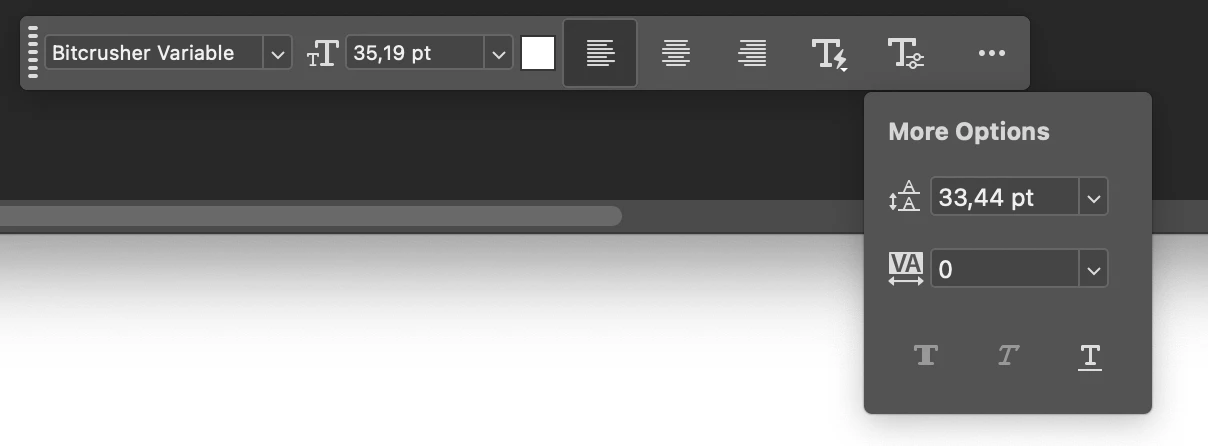
Canberkzz_0-1768900658269.png


2 replies

January 20, 2026

That's not the case at all. I do social media design mostly. I use variable fonts on my designs to use right weight on the text to convey the message better. That's why I need the contextual text bar's "More options" section to have two or three more sliders on it which are already under properities panel. There are way more usecases of variable fonts other than UI design

creative explorer
Community Expert
Community Expert
January 20, 2026

@25720370 I get it when askig about extending the font properties for variabl fonts—but, Photoshop is an image editing application; it isn't like Figma or any other web application that deals predominatly with web interface design. Yes, I would love it, but I ideally, you shouldn't be creating a mockup for the web in Photoshop. There are better and easier applications than that such as Figma or Xd

m