



4k Multicam Source Sequence in HD timeline
Not sure if this is a bug or a long-term feature request - admins feel free to place this in the appropriate category
My Rig:
Premiere Pro 25.5.0 Build 13
Mac Studio M2 Ultra
64GB Ram 1TB internal storage
My goal: I like to use 4k multicam source sequences in my 1080p timelines, as it allows me to dynamcially zoom/pan the cameras for added effect when appropriate. In multicam preview mode, I would like the preview monitors to respect the resolution and scaling of the timeline being edited. it seems that the preview monitors honor the scaling of the source multicam sequence regardless of how it is scaled in the main timeline. If my 4k footage is scaled to 50% on a 1080p timeline, the preview monitors should reflect that for all camera angles. (see attached screenshot)
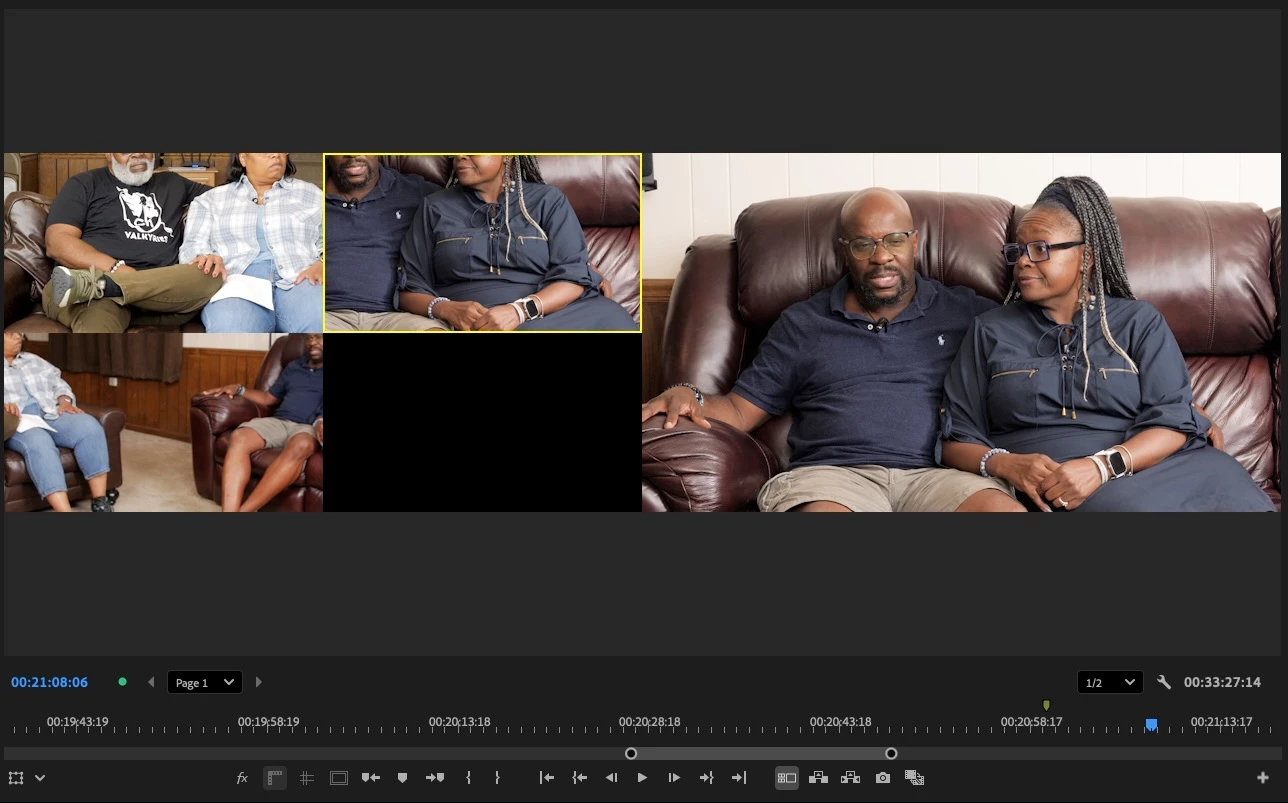
Weirdly enough, the main monitor in multicam preview seems to "snap" to the resolution once playback is stopped, so it seems there is some logic in the code to read this - it is just not being applied to the other preview camera views.
This is more of an annoyance than a workflow stopper, but I wonder if there is a setting to fix this.
Any suggestions?
Andre
 AdChoices