
Known Participant
February 1, 2023
Open for Voting

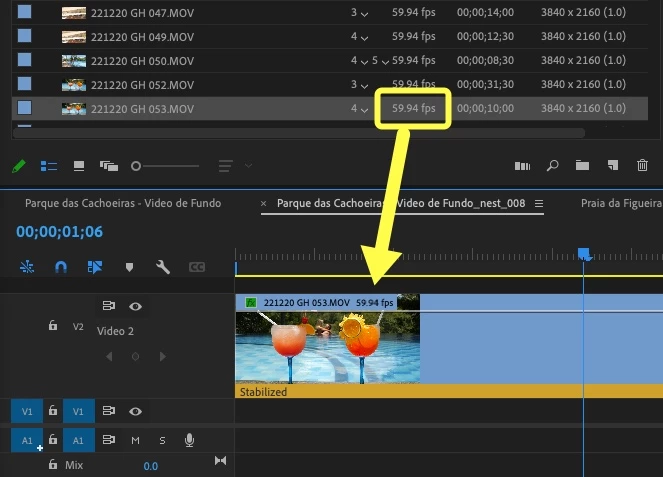
Add FPS info to clips in Timeline

  • February 1, 2023
  • 2 replies
  • 364 views

I would LOVE to be able to see at a glance what's the FPS setting of the clips in my Timeline!  This optional info could be displayed next to each clip's name.  This would make it a LOT easier to know if a clip was recorded at 60 or 120fps and can therefore be slowed down in a 30fps Timeline without any motion artifacts.  At the moment, I need to right-click on a clip and select "Reveal in Project" to find out what FPS a clip has.  This is time consuming and tedious.  PLEASE add this!  Thank you!
 

2 replies

Known Participant
February 1, 2023

Thanks for the response smrpix.  I agree that using labels can work for some, but in my case it wouldn't since I colour label my clips based on their content.  The same idea in my FR could also be applied to sequence tabs in the Timeline, to be able to tell the FPS setting of each sequence at a glance.  I'll create a new illustration and FR for this.  

Participating Frequently
February 1, 2023

I agree it would be great to be able to customize the clip display name with fps, or any other metadata.


In the meantime, you can identify clips with different fps by using different color labels for each fps type.