


Known Participant
December 29, 2024
Open for Voting

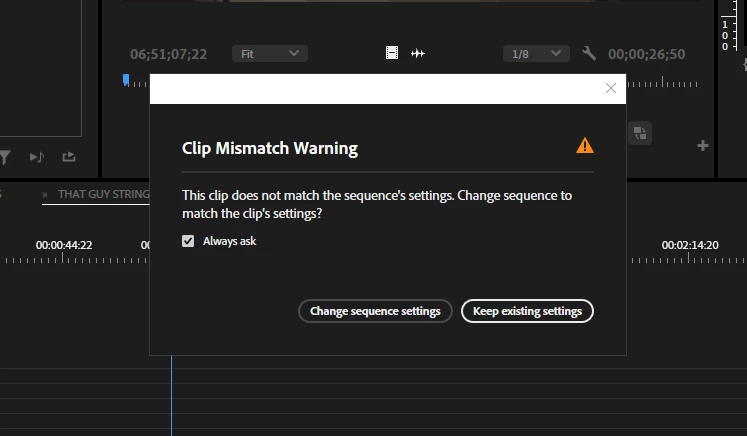
Add more information for users to define what needs to be changed (maybe?)
  • December 29, 2024
  • 7 replies
  • 433 views


Give me more information please. In all facets of this program, give me more information.

Maybe give me.... oh I don't know, what the sequence setting is? What the clip setting is? Obviously the program is reading these metrics to detect the mismatch? Maybe TELL ME THE MISMATCH.
Give me more information!!!!!! I don't know what proxy file is selected, I don't know what file was matched to what file, I don't know what sequence and clip settings are mismatched, I don't know so many details of the workflow that I use every single day because it's hidden behind a dialog box I can't click out of.

Over $580/yr for these kind of slights in user interfacing. Unbelievable.

7 replies

MyerPj
Community Expert
Community Expert
January 27, 2025

The sequence is the one you just dropped it into, and is the one open in the timeline panel, just glance over to it's tab. And the clip is the one you are looking at either in the project or the source monitor, so you have that abundance of information right there and now.

Known Participant
January 27, 2025

Good suggestion but the dialog box doesn't indicate what sequence is being altered for what reason or why the failure of sequence matching is going on. You see how this positive feedback loop is everything but positive?

MyerPj
Community Expert
Community Expert
January 17, 2025

Maybe name your sequences to have something to do with the aspect ratio?

Known Participant
January 17, 2025

Unfortunately I disagree with you. I have 8 sequences in this project. 3 horizontal, 3 vertical, 2 1x1. All of these varieties are hard to keep track of and nonsensical when you push into any kind of complex sequence structuring. Adobe should use the massive text box space to provide more information to the end user.

MyerPj
Community Expert
Community Expert
December 30, 2024

In this case, I think you're wrong. That's a very basic message, it only pops up on the first clip into a sequence, so assuming you, the editor know what  kind of sequence you want to work with, then just answer yes or no to the dialog. If you want a sequence to be set by the clip, just drag that clip to the New Item button on the bottom of the project panel, and PP will make a sequence using the clip info.

Known Participant
December 30, 2024

I'm upset with the complete lacking of given information for every dialog box in Premiere Pro to be quite honest. The price is a subjugation of that, for sure, but if the program understands what it's doing, why not explain it to the user?

You also don't understand what I'm asking. I can't do *anything* if that dialog box if open. Now when working through dozens of dozens of sequences for this project, why does it not tell me exactly what I'm mismatching? Why do I need to close the dialog box, find my sequence settings, close that dialog box, open the metadata panel for the clip, and compare and contrast the two?

Why does the dialog box not tell me:
The clip does not match the sequence settings.
Sequence: 60.00 fps
Clip: 23.98 fps
Change settings to match sequence or keep clip settings?

Do you see how easy that is to implement more information?

MyerPj
Community Expert
Community Expert
December 29, 2024

Try some basic tutorials on how the program works. That's one of the most basic messages one can receive.

You've created a sequence, then drop in the first clip and it's not the same as the sequence you created. Sequence settings are available, so are your clip info... 


Or is it really a rant on the price...