


Advanced & User-Friendly Graph Editor for Premiere Pro (Speed + Value)
Advanced & User-Friendly Graph Editor for Premiere Pro (Speed + Value)
The Idea
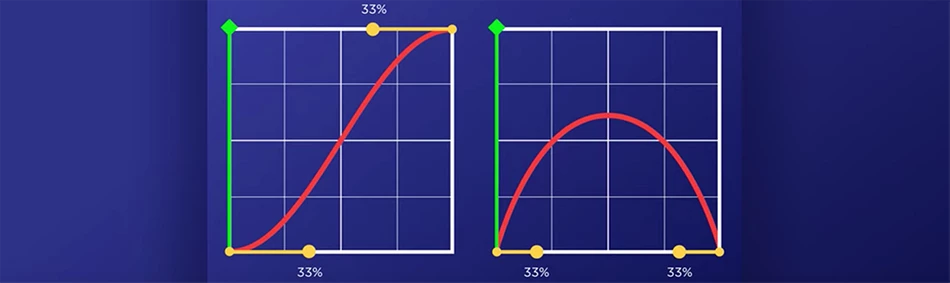
Introduce an enhanced Graph Editor UI within the Effects Control Panel in Adobe Premiere Pro — offering a dedicated, intuitive, and scalable graph interface similar to After Effects, tailored specifically for video editors.
Key Features
-
Dual Graph Modes
-
Speed Graph: Adjust temporal interpolation smoothly, with speed-only control for precise motion timing.
-
Value Graph: Modify spatial or numerical values (e.g. scale, position, opacity) using value-specific curves.
-
-
Larger UI & Responsive Graph Area
-
Big, draggable Bezier handles
-
Resizable editor panel (even full-screen toggle)
-
Zoom + pan control for precise fine-tuning
-
-
Snappy & Intuitive UX
-
One-click switch between Speed & Value Graphs
-
Smooth UI performance with clear keyframe indicators
-
Modifier keys (Shift/Alt) for snapping, linear hold, or easing options
-
-
Graph Presets & Custom Curves
-
Save & reuse favorite curves
-
Access to community curve packs (optional marketplace integration)
-
Drag & drop preset system with live preview
-
-
Contextual Tooltips + AI Suggestions (optional)
-
Smart suggestions for easing types
-
Instant smoothing based on adjacent keyframes
-
The current keyframe graphs in Premier Pro are way confusing & complex + bad ui/ux.
It's a bit hard to edit the graphs since they are too small.
Why This Matters
-
Not a new request — a long-standing user pain point
Thousands of editors, from freelancers to studio-level professionals, have requested better graph tools in forums and feedback hubs for years. -
Massive time-saver
The current graph editor is too small, hard to interact with, and unintuitive — especially for editors coming from After Effects or DaVinci Resolve. -
Brings motion precision to Premiere
Editors who do complex transitions, speed ramps, text animations, or motion templates will finally have a native, pro-grade solution inside Premiere, without switching to After Effects. -
Huge for motion-driven workflows
YouTubers, content creators, agency editors — everyone needs more control over animations and motion without relying entirely on AE.
Who It Helps
Freelance editors & solo creators
Content agencies & production studios
YouTube editors, TikTok creators, Reels specialists
Motion designers looking for basic motion controls inside Premiere
Vision
Let Premiere Pro not just catch up — but set the new standard for timeline-based motion editing.
Make it fast. Make it fluid. Make it powerful — without ever needing to leave the timeline.
 AdChoices