


Auto Transcript-Based Audio Mute/Cut Tool for Censorship (Auto-Mute-Cut Words)
A feature idea that could really streamline the editing workflow for creators and editors working with dialogue-heavy content, especially those who need to keep clips monetizable or brand-safe.
You already have a great tool with Text-Based Editing / Auto Transcript Cut, which allows us to quickly cut sections of video directly from the transcript. I’d love to see an audio-specific expansion of this for censorship purposes — something like:
Auto-Mute by Transcript (Censorship-Friendly Audio Tool)
What it does:
Detects and highlights curse words or custom-specified words from the transcript.
Gives the option to either:
Mute just the word's audio (without altering the video or cutting the audio clip)
Delete the word’s audio entirely, creating a moment of silence
Leaves the video completely intact, so there’s no desync between audio and visual tracks — perfect for content that needs to retain timing (for example, for captions, multicam edits, or social cuts).
Why It’s Needed:
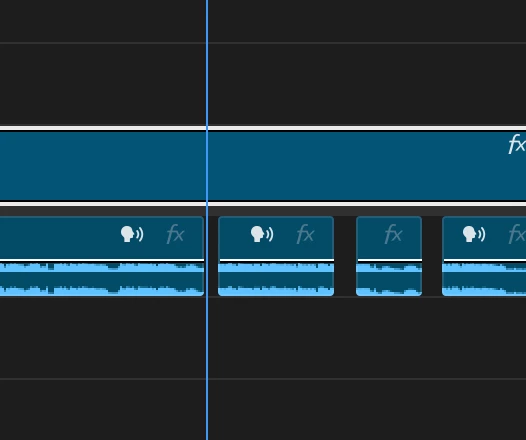
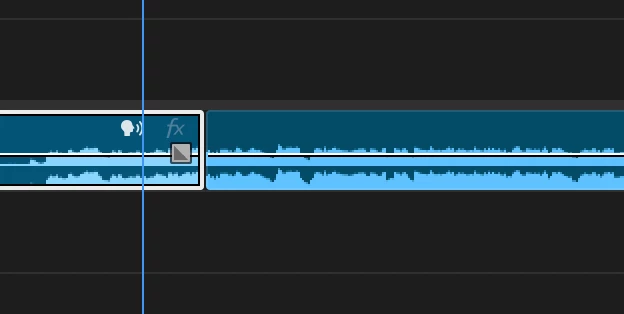
When we currently cut audio using the transcript to remove profanity or sensitive words, Premiere cuts the entire clip, including video, and that throws off timing and sync across other layers.
This new tool would allow creators to clean up audio without cutting into the timeline, keeping everything else aligned.
Extremely useful for:
Social media edits (Facebook, YouTube, TikTok)
Podcast visualizers
Brand-safe or monetized content
Quick turnaround on censored versions
Bonus Ideas:
"Smart Mute Preview" button: So editors can hear what the track sounds like muted before applying changes.
Censor Presets: A built-in list of common curse words that can be toggled on/off, plus custom word options.
Visual markers on the waveform or transcript to show muted/censored sections.
Attached are a couple of images showing how this process currently works when trying to cut audio directly from the transcript. As you’ll see, removing words cuts the entire A/V track — which isn’t ideal for censorship-only workflows.
Thanks for considering this — would love to see this added to Premiere Pro’s already powerful suite of text-based editing tools.
 AdChoices