


Known Participant
January 17, 2025
Open for Voting

Better panel sizing optimization e.g. Properties Panel

  • January 17, 2025
  • 4 replies
  • 310 views

This text panel is completely unresponsive to size changes, and does not indicate that if the panel is too tight that there are entire sections of input invisible to the end user.

Here is the opened panel:
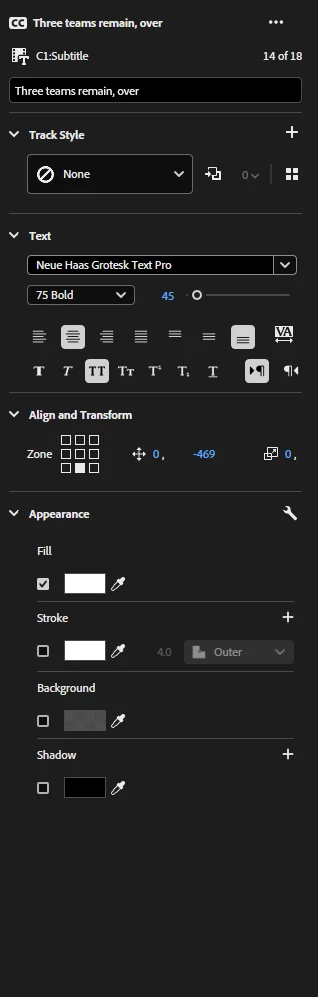
Does anything look off? Because I was joking, that panel is tightened and has no indication of missing features or inputs. This next photo is the opened panel.
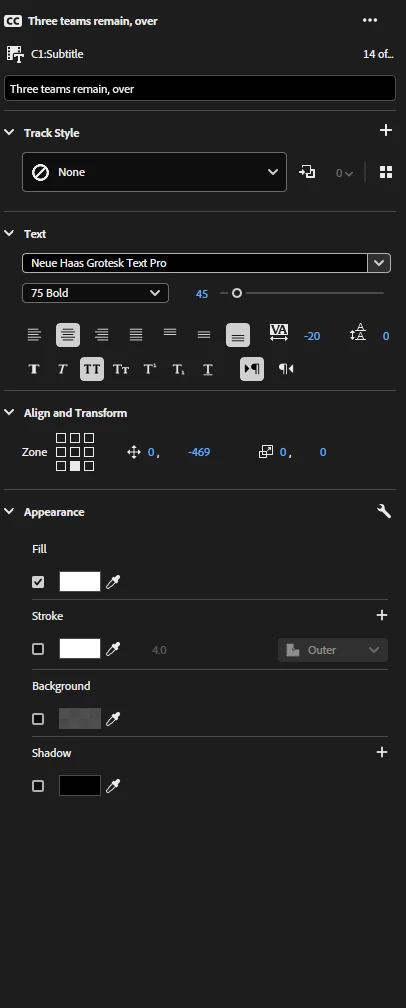
These kinds of unoptimized panel hard points are extremely frustrating from a workflow and design standpoint. Maybe allow the end user the ability to drag those lined section dividers to deepen the space that those multiple controls utilize?

1. 25.0.0

2. Windows 10 64bit

3. Resize the Properties Panel, or almost any panel whatsoever

4. Better adjusted empty space or decrease of that thereof. Unchanged empty space.


4 replies

Known Participant
January 31, 2025

LOL! thank you for the positivity 🙂

MyerPj
Community Expert
Community Expert
January 27, 2025

Well, now that you are so familiar with that panel, you'll know when you are missing things and will thus make it a little wider to show all the things you want to see. Good job! 🙂

Known Participant
January 27, 2025

I need you to look very closely at the two images above because this is exactly why I made this post. You've completely missed the several parameters that are cut off, because when the panel is narrowed those parameters are hidden away without any indication that they've become hidden.

There is absolutely no indication that the "text spacing" variable scale, the "text height" variable scale, or even the anchor point y-axis is completely hidden from view. This kind of panel design and nonresponsiveness is incredibly confusing and detrimental.

A better method of panel design would be to utilize the rest of the white space that's seen in the attached images. Allow the user to move the lined dividers inside the panel itself. Allow the sliders to be more condensed. An incredibly lazy way to solve this problem is to indicate to the user that some parameters are blocked/hidden due to the panel size being too narrow (which is lazy design and shouldn't be implemented)

MyerPj
Community Expert
Community Expert
January 17, 2025

So, get rid of the ability to size that panel smaller / narrower?