


Bring Back Rosetta Support
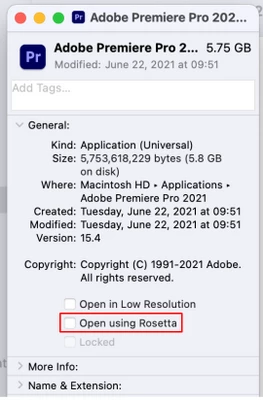
Adobe have scrapped support for Rosetta moving from the Adobe Premiere Pro CC 2024 update.
As per consultation with an Adobe support agent, I was told that while the CCDA (Creative Cloud Desktop Application) still shows the ability to open using Intel, this still runs in M1 (MAC ARM) mode only.
This is confirmed in the Known issues in Premiere Pro Knowledgebase article here:
https://helpx.adobe.com/premiere-pro/kb/known-issues.html#sa_src=web-messaging
This means that plugins that were developed prior to the relatively recent release of M1/M2 systems, can no longer be used with Adobe Premiere Pro. This is a huge loss.
While I understand that this was probably done in order to make performance improvements, please reconsider or find a different way to allow Premiere Pro to be booted in Rosetta mode, if a Premiere Pro user would like to boot with that option and have it remembered with the "Open using Rosetta" checkbox on macOS.
Cheers!
 AdChoices