


Participant
July 21, 2021
Open for Voting

Change to Color Effect Has Been Removed - Please bring it back.

  • July 21, 2021
  • 18 replies
  • 26996 views

Can anyone help me? I just recently turn off my computer for a night's rest then the next day this pops up. My premiere cant seem to find the change to color filter and I dont know how to get it back. pls help need this asap, big thanks.
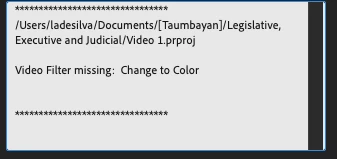


I altered lot using this filter!!! Pls help me need this asap!! Big thanks!!!


Mod note: Title changed slightly.

18 replies

Kevin-Monahan
Community Manager
Community Manager
December 19, 2023

Hi @Linglingonly_, @Abigail34342588npey, @arkid, and others on the thread,

I have moved this discussion to the "Ideas" forum to be considered for the effect to return to the feature set. Please upvote! Sorry for the frustration.


Personally, I would create a .mogrt containing the effect from After Effects where the effect still exists.


Thanks,
Kevin

Kevin Monahan - Sr. Community & Engagement Strategist – Pro Video and Audio
Participant
December 19, 2023

Same thing, I need that tool, I use it all the time to correct clients colors on graphics within thier videos.

R Neil Haugen
Legend
December 19, 2023

@mattchristensen  ... how would you suggest changing a color to a precise selected numbered color at this time?

Everyone's mileage always varies ...
Ann Bens
Community Expert
Community Expert
December 19, 2023

This color replace effect is off; colors are not the same as in the color picker.

Participating Frequently
July 18, 2023

Another frustraited user here. I had no idea that the plugin was obselete. I'd picked it for use just a few years ago in a project and had been using it happily.  Just made the switch from PC to MAC and now find it's not there.

Participating Frequently
January 30, 2023

Hi there, just wondering if the Change to Color effect is going to be reinstated? As many have pointed out here it was a very useful, quick tool. And in the future, can Adobe reach out to subscribers before removing effects for no reason??

Ann Bens
Community Expert
Community Expert
January 30, 2023

Probably wont be reinstates.

Removed effects are first place in the Obeselete folder, so you know one day they will be gone.

Color Replace might do the trick.

Participant
October 19, 2022

Can Adobe add this effect back in an update? Premiere is now missing one very large use case with color correction which is to directly swap out hex values from one to another. This is particularly important when adhering to branding standards. I can't do this with Lumetri color today. Please, I need this effect back. I am on M1 Mac and can't access this in obsolete. 

Peru Bob
Community Expert
Community Expert
October 19, 2022
quote

Can Adobe add this effect back in an update?


By @Marty Merida


Please post that here, where the Adobe engineers read all threads:
https://adobe-video.uservoice.com/forums/911233-premiere-pro

Kevin-Monahan
Community Manager
Community Manager
July 24, 2021

LL,

It's in the Obsolete category. Reapply it from there. Come back with any questions or if this advice worked for you.


Thanks,
Kevin

Kevin Monahan - Sr. Community & Engagement Strategist – Pro Video and Audio
Participant
July 24, 2021

Hi, yup I've updated the app already. Apparently, the first commenter was
right that it was inside the obsolete folder but only the intel version can
view it. I had to open the intel version from the CC app since every time I
click on the premiere pro app, it automatically opens using the apple m1
version. Just a bit of a hassle since I have to go through the CC app just
to use the intel version but as long as I can use it I guess. The mac
version w the obsolete folder doesnt have the change to color one btw. Hope
this helps! Thanks for the replies, cheers.

Kevin-Monahan
Community Manager
Community Manager
July 26, 2021

Sorry about that LLO,

You can create a secondary color correction directly in the Lumetri Color panel. Check the "Color Wheels and Match" controls, then inspect the HSL Secondary Controls. Here you can pick a color to control, and can change that color in the color wheels themselves.


Feel free to return with any questions.


Thanks,
Kevin

Kevin Monahan - Sr. Community & Engagement Strategist – Pro Video and Audio
Peru Bob
Community Expert
Community Expert
July 24, 2021

I think that was removed from the latest version.

Do you have the CC App set to automatically update?

Participant
July 24, 2021
Hi, yup I've updated the app already. Apparently, the first commenter was
right that it was inside the obsolete folder but only the intel version can
view it. I had to open the intel version from the CC app since every time I
click on the premiere pro app, it automatically opens using the apple m1
version. Just a bit of a hassle since I have to go through the CC app just
to use the intel version but as long as I can use it I guess. The mac
version w the obsolete folder doesnt have the change to color one btw. Hope
this helps! Thanks for the replies, cheers.
Community Manager
July 23, 2021

Hi there,


We're sorry to hear about this. Let us know the version of Premiere Pro that you are using. Have you tried creating a new project to check if you are able to add Change to Color effect to a clip in this new project? In case the effect is missing from the Effects panel, try reinstalling the app & then check if it's working properly.


Thanks,

Sumeet