


collapse or minimize this left-side track control panel when we’re not actively using it
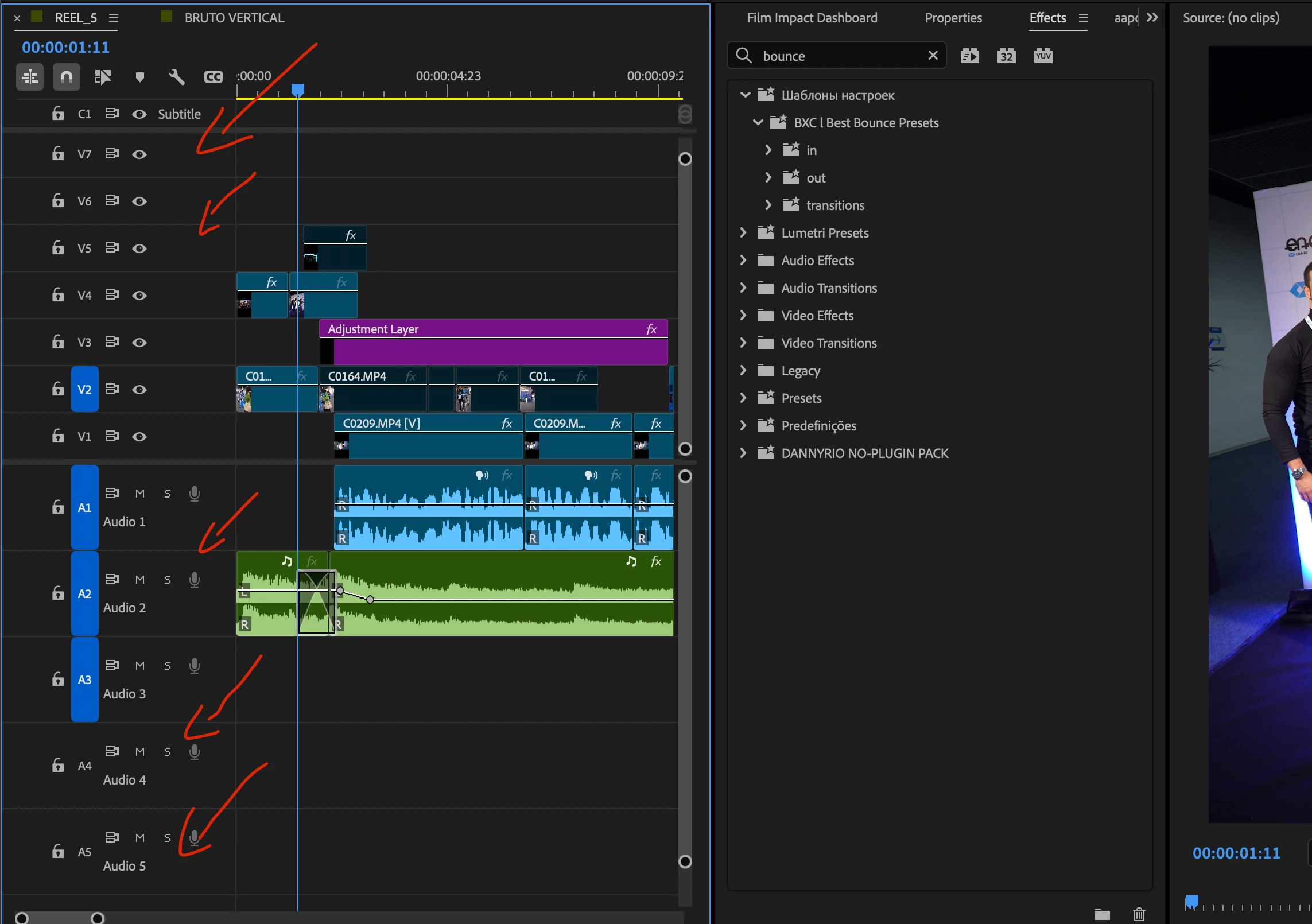
I’d like to suggest a small but very useful improvement to the Premiere Pro timeline UI.
As shown in the screenshot, the track header area on the left takes up a significant amount of horizontal space. When working with multiple video and audio tracks, this reduces the amount of space available for the actual timeline and makes it harder to see more of the sequence at once.
It would be great to have an option to collapse or minimize this left-side track control panel when we’re not actively using it, similar to how some other panels in Premiere can be collapsed.
Ideally, there could be a small button or shortcut that would toggle between:
- Expanded: showing all the current track controls (lock, visibility, track targeting, mute/solo, etc.)
- Collapsed: showing only a minimal strip with the track labels or even just the track numbers.
This would be especially useful when working on large timelines with many tracks, where horizontal screen space is extremely valuable.
It could also be implemented as an optional “Compact Track Headers” or “Collapse Track Controls” feature in the Timeline settings.
I think this would make the timeline much more flexible without removing any existing functionality.
Thank you!
 AdChoices