
Open for Voting
Export > Preview time selector immediately unselects itself after clicking to edit it
In the Export > Preview pane there's a blue time thing that says where the playpoint is. When i click on this it opens for editing like so:
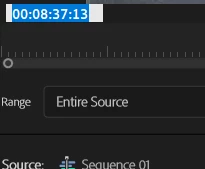
But as soon as I click somewhere in there to put the cursor there to type in my edits, it immediately unselects.
There's no way to put your cursor where you want in that little time box to edit with your keyboard where you want. The only way I can edit it with keyboard is to click to activate it and then use my keyboard right/left arrows to navigate from the right hand end of the string.
NOTE: This DOESN'T happen in the video view panel when I'm Editing a video, only in this Export > Preview screen.
Adobe Premier Pro 24.2.1 B2
Windows 11


 AdChoices