



FEATURE: make Nest unique
Premiere Pro nests (as well as AE comps) have a very big drawback when you have to create lots of them - they are not unique on the timeline.
Usually when you need to create a clip with an effect or some kind of animation, like by position or scale, but you don’t want to fiddle with the different sizes of the media, you just make a nest, add all the effects and animations to it (on the “outside level”) and then just change the inner media. The problem with that is that Premiere Pro treats every nest on your timeline as a copy of the one that is automatically created in the project bin, so if you copy one nest 3 times and change the inner media in one of them it will change in the rest to. To solve this problem you have to manually duplicate the nest in the project bin and then place it to the timeline as a copy. This works in smaller projects but when you have tens and hundreds of replaceable nests like this you may go mad and get lost in your project.
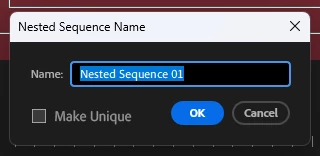
What I suggest is adding a checkbox in the Nest right-click menu called Make Unique. Upon clicking this checkbox you will automatically convert the currently selected nest into a duplicate both in the timeline and in the project bin.
 AdChoices