



Feature Request: a synchronization upgrade for Premiere Pro
I'd like make a feature request and to draw everyone's attention to the problem no one seems to pay attention to in regards of the synchronization mechanizm in Premiere Pro. I mean this function:

The good and almighty Sync function that is here to save our time and sync "in seconds like a pro" like bloggers like to say, under the skin is the worst sync feature out there. Let me explain with this fantastic example.
What will happen if you place on the timeline a ready-made video with all your cuts and transitions, background music and SFX, but with one part in the video where there's a clear and sound voiceover, and try to sync it with the same voiceover or a video from the originsl clip? This is what will happen:
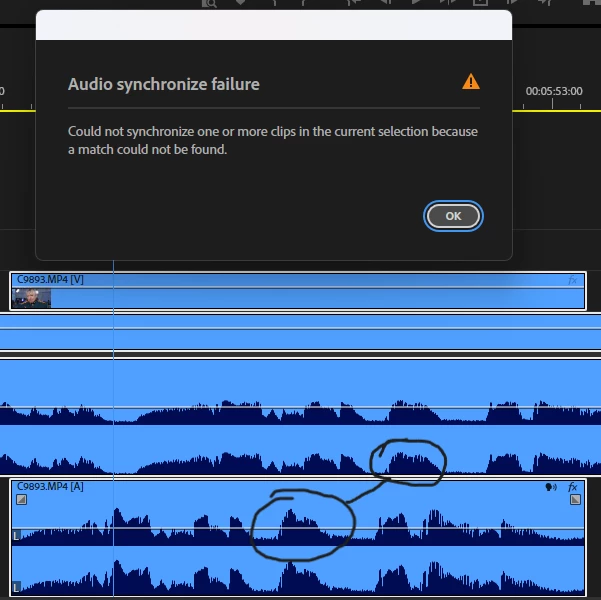
Dispite the fact that both the parts are identical in sound and you can see it by the waveform (a slight compression should not be an issue), and I even moved the parts closer to each other, they refuse to sync.
Why?
Because Premiere Pro ignores the IN and OUT points of your clips. You cannot trim the clips from both sides and synchronize them because Premiere Pro goes on treating every clip as a whole. You can even tell it by the time it takes Premiere Pro to Sync a 5 seconds cut-out. And should you just render the clips and try to sync the rendered parts, viola!:
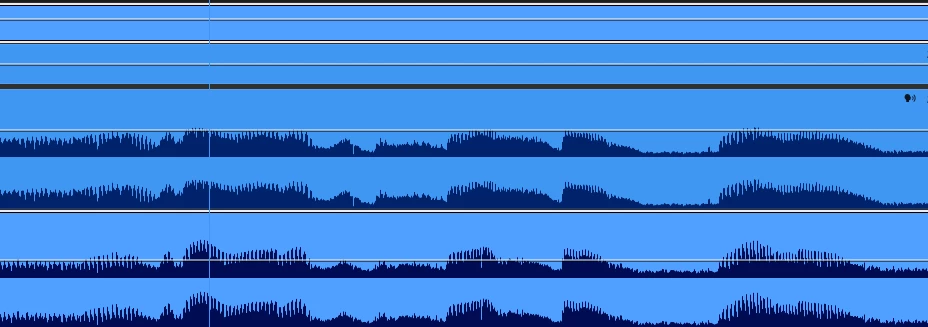
But for some reason this does not work with Render and replace and Nesting.
So I have a feature request for three features in regards to how Premiere Pro synchronizes clips.
1) All clips should be viewed as "final" by the software. If a cip is trimmed, it should be analyzed and synced as a rendered clip - fast and accurate. So when a user has a difficult material, they could limit the cleanest and most obvious part of it with an in and out points or just cut it out, then sync it with the rest of such bits from other clips, and then just bring back the cut-off parts by dragging.
2) I may be mistaken but I dare to think that we live in 2025, almost 2026. And having to place every clip on a different track in order to make Premiere Pro synchronize them is kind of antique. PluralEyes could automatically define cameras, timecodes, analyze the soundwave and automatically manage the clips to sync them properly back in 2010. Do I have to remind everyone why Maxon discontinued this software?

"These capabilities have become standard in most video editing tools"... (с) Where's that standard in Premiere Pro? When you sync automatically you either get a multicam error or a synchronization error with the same media PluralEyes has no problems with after just throwing all the clips and sound into it. And since it was discontinued, i.e. it's not updated, nowadays you get a lot (A LOT!) of issues when using this outdated software with the modern Premiere Pro. We really need a working automatic synchronization function without the need to place clips on separate tracks and create a multicam sequence. In fact there should be no track management at all and every clip from one camera should be placed on the same track as every other clip from the same camera.
And the last thing. Adobe is a pioneer of AI, and there's still no AI used for analysing clips before syncing or making a multicam sequence from them. AI is everywhere but the really needed funstions. I would gladly trade the AI-clip-extend feature to an ability ty sync EVERY media that has at list 1 second of distinct audio in it with just one click.
 AdChoices