



Feature request: better AI masking tool
There is an AI object mask tool in the current Beta which will be added in Premiere Pro 26. I tested the beta version and it was genuinely good, but the way it is applied is not as fast and intuitive as it could be.
Right now the mechanism is this:
- select the MOT in the instruments panel
- click an object in your footage to select it
- hit the tracking button to gather the tracking data.
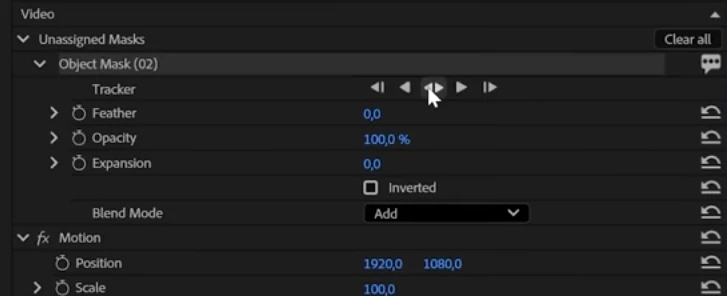
By default this tracking data does nothing. In order to use it you have to apply it to a property. For instance, if you need your object isolated from the background, you need to apply (copy) the tracking data (unassigned mask) to the opacity property. If you need to isolate an effect - you copy it to an effect property.
This system does not work with any effect plus it feels external, like Mocha, not integrated into Premiere Pro, not native, despite the dedicated buttons in the interface.. And it demands additional button clicks.
I suggest taking away the AI object mask tool from the tools panel where it has no reason to be since it's not a timeline tool, and adding a corresponding button to the opacity property of any effect so you don't have to copy-paste the tracking data but rather create the mask directly in the needed property. Then the tracking data can be copypasted to any other property of any other effect if needed.
Another thing to think of is this:
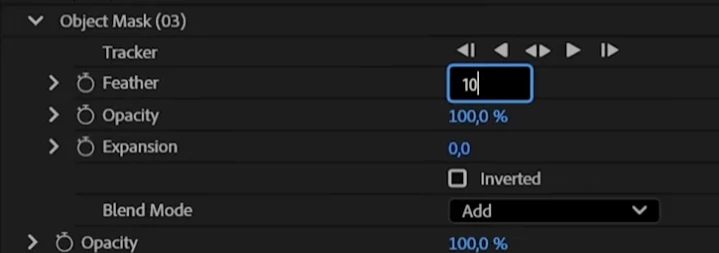
These are the only properties of the AI object mask. It badly needs a reduce chatter, adjust detail, use motion blur, a smoothening and a decontaminate edge colors options. Sometimes the masks come out so rough and including so many background details that it renders such a mask nearly unuseable. Only some additiona effects like adjust alpha or erode help to fix it to an extend, but these are even more additional actions.
And the last thing - in the Beta I could not ease the keyframes created by the unassigned mask. In case the mask jaggers at some point, in After Effects I delete one or several intermediate keyframes and ease them and that helps immensely to interpolate them and reduce or even remove the jaggering. In Premiere Pro you cannot do that (at least in the last Beta I used).
 AdChoices