



Open for Voting
Feature Request: Better Vertical Video Workflow (Batch Rotation & Adaptive Thumbnails)
Hi everyone,
With a massive portion of video production today destined for social media, vertical video has become the standard for many Premiere Pro editors. Having a versatile and optimized workflow for vertical formats is more crucial than ever.
I do a lot of my rough cuts directly in the Project Panel using Icon View. My workflow consists of hover scrubbing the thumbnails to set In and Out points before inserting the clips into the timeline. However, working with vertical video presents two major friction points in the current UI:
1 - The Need for Pre-Timeline Batch Rotation (Interpret Footage)
- Many cameras shoot vertical video but save the file horizontally. When these are imported, the thumbnails are rotated 90 degrees sideways in the bin. This makes hover scrubbing and selecting I/O points extremely difficult because I have to tilt my head to see what's happening.
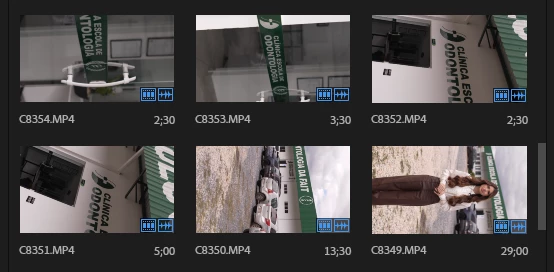
- Suggestion: Add a Rotation/Orientation override in Modify > Interpret Footage. This would allow us to batch-select sideways clips, set them to vertical, and have the Project Panel thumbnails update immediately so we can hover scrub them in the correct orientation.
2 - Adaptive Thumbnail Aspect Ratios (Remove Wasted Space)
- Currently, the Project Panel forces a horizontal 16:9 bounding box for all thumbnails. When a clip is vertical, it gets massive empty spaces (pillarboxes) on both sides.
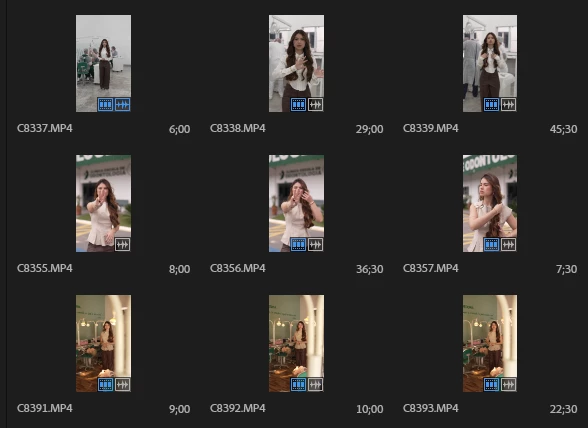
- Suggestion: Make the thumbnail bounding boxes adaptive to the clip's aspect ratio. Vertical videos should have 9:16 thumbnails that sit closely side-by-side without large gaps—very similar to how clips are neatly arranged in the new Color panel UI. This would save massive amounts of screen real estate and make hover scrubbing a bin full of vertical clips much more fluid.

New Color Mode Timeline
Thanks for considering these workflow improvements to help social media editors!
 AdChoices