


BradMpls
Inspiring
January 20, 2026
Open for Voting

Feature Request: Premiere Pro Timeline Track Highlight

  • January 20, 2026
  • 4 replies
  • 48 views

When my sequence timeline begins to fill with multiple tracks of clips (video and audio) and I want to, for example, toggle the track output or mute the audio, it's a bit challenging to find what track the clip is on, when there are maybe 12 tracks and they're at the minimum height. Wondering if Adobe can pop a track highlight color or frame on the affected timeline track nomenclature (left of the timeline) when a clip on said track is selected?
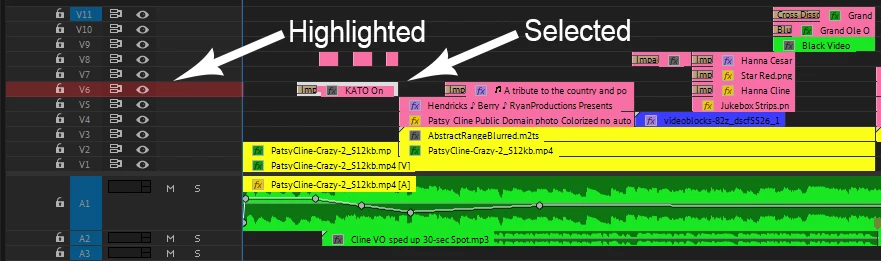
Track Highlight Image.jpg

4 replies

Inspiring
January 22, 2026

Amazing idea. Upvote x5. Would also be nice if it came with the option to make clips in the timeline match the corresponding track color. Would be a great tool for visual organization in the timeline. 

Inspiring
January 21, 2026

That's a great idea.
For now, you can check Excalibur: I use it for soloing one or multiple tracks that have clips selected in it.

Community Expert
January 21, 2026

+1

MarekMularczyk
Community Expert
Community Expert
January 21, 2026

That's actually a very good idea! I'd like to upvote it!


Adobe Community ExpertAdobe Certified Professional