


Inspiring
October 2, 2025
Open for Voting

Feature Request: Toggle off source clip data window in timeline

  • October 2, 2025
  • 6 replies
  • 994 views

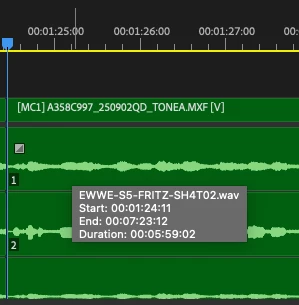
It would be great if we could toggle off (and on) the grey window that shows source clip data in the timeline when the cursor hovers over a clip - it's un-necessary for me and gets in the way of editing when I'm using waveforms to identify the start & finish of words (which is incrediby frustrating!). 


6 replies

Inspiring
October 28, 2025

that's exactly what I'm requesting 

Inspiring
October 15, 2025

only if it doesn't force the minimum width of the sidebar any wider, as someone that condenses it as much as possible it would be quite frustrating if it was forced wider than it already is 


Adobe Employee
October 15, 2025

What if there was a toggle that had a set of overlay options that globally turned them on or off that sat on the timeline where the snap magnet icon lives?


Nick Lear
Inspiring
October 3, 2025

Yes, good idea.

Inspiring
October 3, 2025

I'm sorry I wasn't clear enough, as being able to toggle off & on this function is what I'd intended to say; I never have a use for it, it just gets in my way, but I dont' want it permanently removed for otehr people, hence my request to be able to toggle the functionality

Warren Heaton
Community Expert
Community Expert
October 3, 2025

I upvoted this, but only as a toggle (enabled/disabled).  I find this to be extremely helpful and would never describe it as being unnecessary.