


Inspiring
March 6, 2025
Open for Voting

Freezing/Performance/Export issues : Media Cache Database location

  • March 6, 2025
  • 2 replies
  • 220 views

I have not done thorough testing, but I believe I caused my Premiere Pro to fail in Playback, Scrub and Export by locating the Media Cache Database in the same place as the Media Cache. (I could be wrong, because this issue only affected DJI 4K DLog .MP4s...?)


Playback, Scrub and Export ALL resulted in stutter and frozen frames (but NO "dropped frames" indication). I have fixed the issue by relocating the Database as follows:
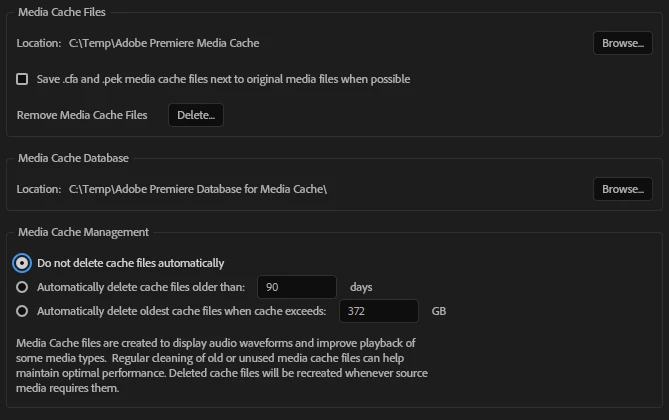
What I did (putting the DB in the "wrong" place) may have been silly (?), but I have spent weeks, including a support session with an Adobe technician, trying to fix this.


I don't expect software to be bug-free, but when it fails there should be a way of telling the user HOW it has failed... to give at least some clue WHERE the problen is. Please bear this in mind as you improve your programs. Thanks.

(You'd think I'd be used to this kind of problem, having used Microsoft programs for 44 years!)

2 replies

MyerPj
Community Expert
Community Expert
March 6, 2025

Reset your preferences.

I'm big into using the computer as you see fit, but I don't understand your modifications? What is the purpose of combining them, Adobe has them in two folders next to each other, just set it back. And they aren't in the temp folder either. ? Here's where they go:

"%UserProfile%\AppData\Roaming\Adobe\Common"


R Neil Haugen
Legend
March 6, 2025

I have two Nvme drives on my desktop, and one is used only for video post cache files ... Premiere, Ae, Audition, Resolve.


ALL cache files, the Pr cache database included .... they are in folders by program. So the Pr cache and cache database are in folders 'next to each other' in the visible ordering of things. Which isn't exactly what is physically happening, but what we can see it as.


I've never had any problem.


So I'm going to guess, that as this only happens on your rig with long-GOP files, that it is something about in/out access and processing speeds needed by that nasty crud media that is the culprit.


Thankfully, I mostly deal with BRAW and ProRes, and normally only 4K to 4.6k, and that stuff flies through the computer with ease. But I know many must work with FX6 or FX3 XAVC formats, all based on long-GOP encoding. Let alone those who have drones.


That's just rough stuff to work with.

Everyone's mileage always varies ...