


Known Participant
February 24, 2023
Open for Voting

Give the mouse scroll wheel the same basic functionality it has in After Effects!

  • February 24, 2023
  • 1 reply
  • 349 views
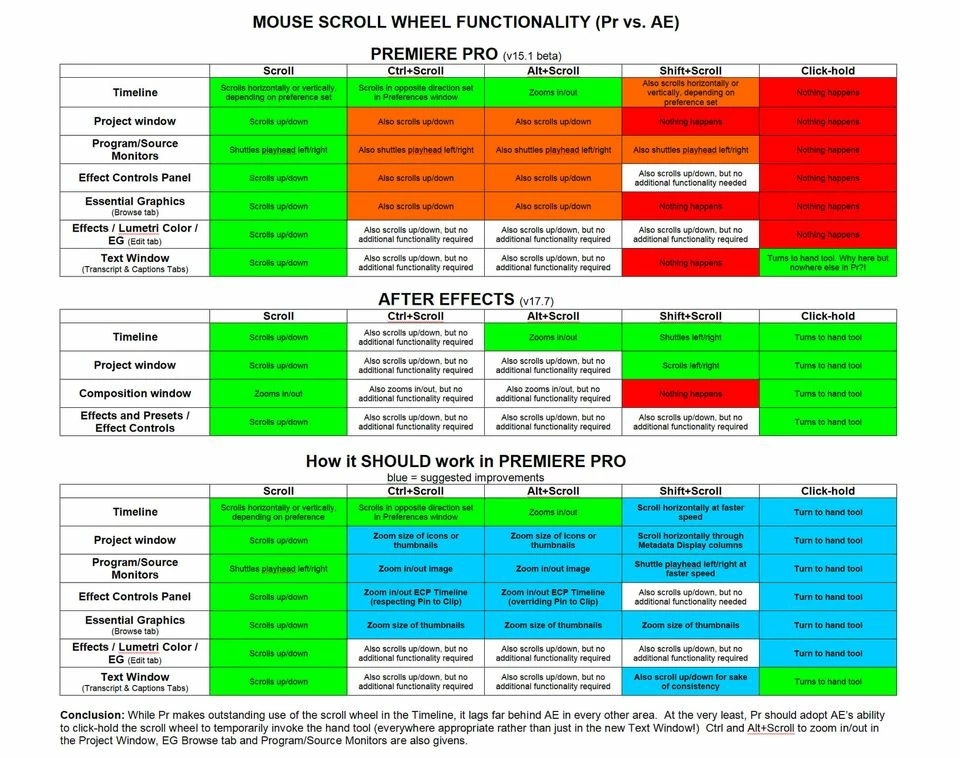
There's no question about it: in terms of mouse scroll wheel functionality, After Effects is great and Premiere Pro falls flat!
 
Why not give some of AE's basic scroll wheel functionality to Pr? After all, aren't both programs made by the same company and meant to work hand in hand with each other?
 
Great scroll wheel functionality also exists inside Pr itself, but unfortunately, only in the Timeline.
 
The new Text window in Pr 15.1 Beta also adds something never seen before in Pr yet a long time feature of AE: the ability to click-hold the scroll wheel to temporarily invoke the hand tool. This is a GREAT feature! So why isn't it available everywhere in Pr that makes sense?
 
Please see the attached charts which compare scroll wheel functionality in Pr vs AE, and suggests how things could be improved in Pr.
 

1 reply

kalamazandy
Known Participant
February 27, 2023

I wanted to comment on this in case that gives in any rise in importance. This should probably also be added to Photoshop and Illustrator as well. They got themselves in hot water when they went through the supposed making transform more consistent by making shift Break aspect ratio rather than keep it. But they implemented it Terribly because even within photoshop, it isn't consistent. Entering warp, then exiting it, switches it back to "normal." And several other tools have it as normal. So all they really did was make it worse because it is now even Less consistent. 

I'd love to see a group take into consideration all of the user input for how you move around in anything that is similar. Oh, audition should be considered here as well. It's multi-track timelines. Why does it get it's own hotkeys/mouse operations? They should all at Least have an option to work the same.