



Stormadv
Inspiring
May 15, 2023
Open for Voting

Hide audio channel or L/R label

  • May 15, 2023
  • 20 replies
  • 3031 views

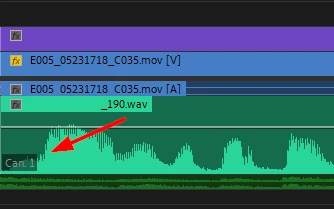
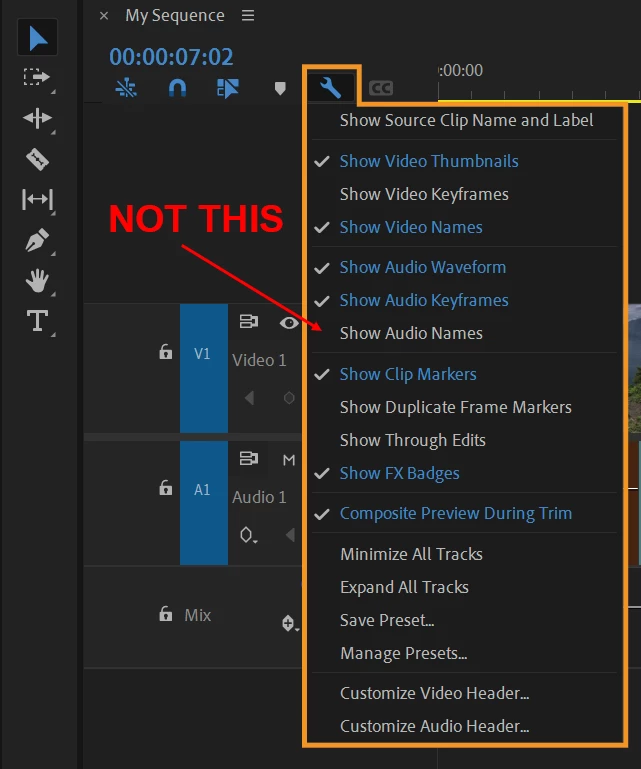
How can hide this label? it annoys me when I have to display the waveform at the beginning (timeline). Attention I don't want to hide the name of the audio resource, but the label that indicates the audio channel or L R (Can.1, Can.2, L R) see image:
Tanks for reply.


20 replies

catheter
Participant
January 27, 2025

Forget what I said about the feature being requested for over 5 years. I've just located a post from 2014....


THIS FEATURE HAS BEEN REQUESTED FOR OVER AN ENTIRE DECADE (10+ YEARS) AT THIS POINT!!!!!!!


Anyone there at adobe?!?!??!?!!?!? Helllllloooooooooooooooooooooooooo???!????

catheter
Participant
January 27, 2025

Also... people have been requesting this feature for over HALF A DECADE (5 YEARS+). Google search on how to remove this labels shows this.


The community has been loudly requesting this feature.... for over 5 years straight.

WHAT IS THE HOLD UP, ADOBE?!?!?!??!?

catheter
Participant
January 27, 2025

These labels were not present or were not as intrusive in premiere 2023.

I've just now updated to premiere 2025, and these labels are ruining productivity entirely.


There needs to be an option to disable these, now. Why were they even made more prominent (obnoxious) to begin with? What did Adobe gain in value for making these labels completely obfuscate the screen?


My day to day work flow is going to be chalked until this is resolved by Adobe.

You guys want us to pay for this software, hundreds of dollars a year, for updates like THIS?! This is why everybody pirates this garbage software suite.


Give us the ability to disable these USELESS audio channel labels, THEY WERE NOT A PROBLEM IN ANY PREVIOUS VERSION OF PREMIERE!!!!!!!!! I DONT EVEN RECALL THEM BEING THERE........

BrianLevin
Known Participant
December 5, 2024

I firmly agree these need an option to be turned off, they serve no real useful purpose.


They are simply in the way of the waveforms at all times. You can change the type of waveform from rectified to normal but if you like your waveforms like this, these labels are obnoxious and get in the way. Just want a toggle to disable them is all.

Kartika Rawat
Community Manager
Community Manager
December 6, 2024

Thank you for your feedback! We appreciate you sharing your thoughts, and we’ll definitely pass this suggestion along to our product team. In the meantime, please feel free to reach out if you have any further questions or need assistance with anything else.


We're here to help!

KR

Ann Bens
Community Expert
Community Expert
July 2, 2024

The only way to get rid of the label is to disable show audio waveform, but that will also eliminate the waveform.

So imo there is no solution but to make a feature request (as in Idea board).

If I remember correctly, these labels first appeared in CC (2013)

Stormadv
StormadvAuthor
Inspiring
July 2, 2024

In fact they are inconvenient, especially on large projects, which is why I opened this request.

Participant
November 11, 2023

The labels are very distracting and completely unnecessary. Please Adobe, add an option to hide them.


Stormadv
StormadvAuthor
Inspiring
October 16, 2023

currently not.

Participant
October 13, 2023

Is there a response on this. I never had tthis label, but it appeared post latest update. How can we hide this label?

Ann Bens
Community Expert
Community Expert
May 15, 2023

Label on an audio track has been there as long as I can remember.

Moving to Ideas board.