



AlexHSTL
Participant
July 26, 2023
Open for Voting

Hover Clip Info: Please add a setting to disable this feature
  • July 26, 2023
  • 4 replies
  • 518 views

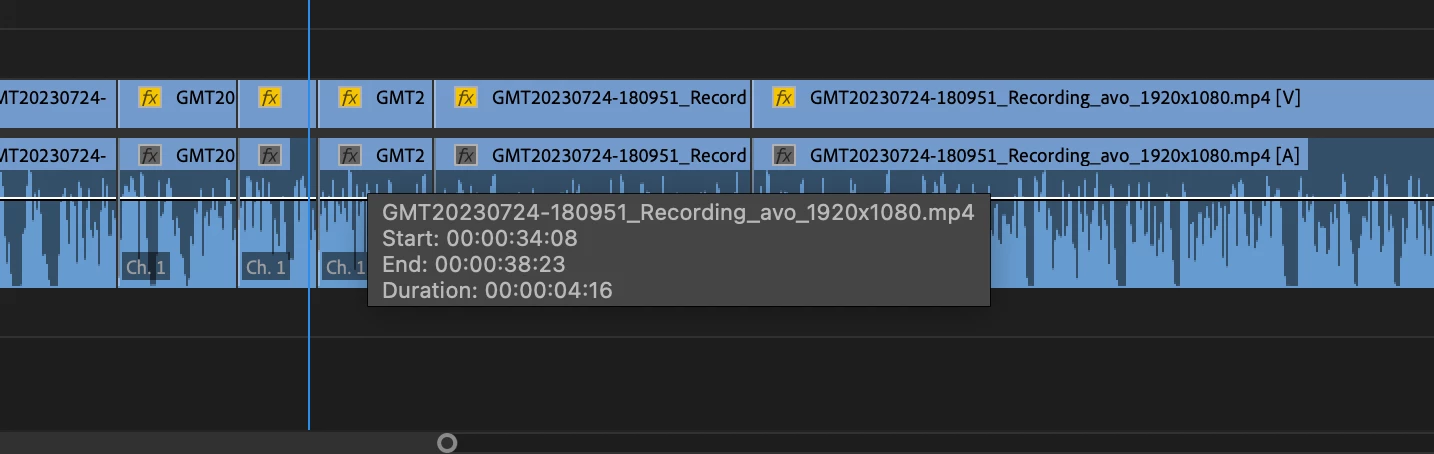
For this feature where the gray dialog box appears whenever the mouse hovers over a clip, can we please get a setting to disable this? I understand its use for displaying clip information, but it's disrupting my editing workflow since it often covers audio waveforms and makes it harder to see cut points, and it becomes a real nuisance particularly in complex timelines with multiple tracks. Obviously it's as simple as moving the mouse away from a clip any time it happens, but this occurs very frequently and seeing this hover info over the timeline is something I rarely, if ever, have any need for. 

4 replies

Inspiring
November 10, 2025

Still an issue and it's driving me mad - keeps appearing and disappearing with information I do not need - please get rid of it!!

_nicdean
Community Expert
Community Expert
January 29, 2025

100% agreed. Please hide if "Show Tool Tips" preference is turned off

Inspiring
January 29, 2025

An option to disable it would be great but ideally this could be fixed.

Happens for me on a Mac and can be consistently reproduced.

  1. Hover a clip on an edit timeline and wait for infomation popup
  2. Cmd+Tab to switch to another app

The pop-up persists until I return to Premiere and whatever timer event / mouse event is being blocked or ignored can finish and remove the popup.

Participating Frequently
January 8, 2024

What is even worse is it stays on top of other app too !
When I command tab to display after effects for example, this useless annoying box is on top of after effects timeline !
Have to go back to premiere, move the mouse away from any clip and then go back on after.
This happens to me 20+ times a day, it's reeeaaaaly annoying