


Participant
May 11, 2018
Open for Voting

How to disable snap to transitions?

  • May 11, 2018
  • 11 replies
  • 4883 views

Hi, I googled for hours but couldn't find the solution. My problem is: I use default transitions a lot in my projects, and I use Snap feature to align clips, and each time I try to align one layer to another, it snaps to other layer's transition, not to it's border.
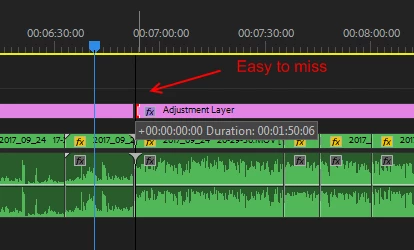
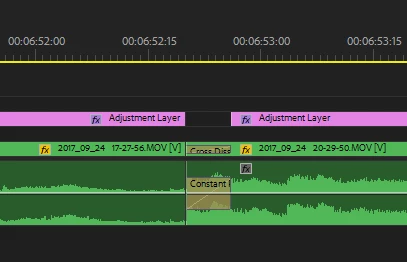
This creates a lot of gaps and misplaced clips, not to mention a lot of frustration. I wonder if anyone needs snap to transition's border more than to clip's border, but Premiere constantly do this, and I have to manually check every junction in my project. The transitions are small and easy to miss, sometimes they're not even visible without zoom, so I don't even know where did it snap to. When you have 1000 clips in a project, this becomes a pain.

Does anyone have a solution for this?

    11 replies

    Vinay Dwivedi
    Adobe Employee
    Adobe Employee
    May 11, 2018

    Hi Just,

    Have you tried going to Effect Control panel menu (three horizontal lines) and tried Snap to feature?

    //Vinay

    Participant
    May 11, 2018

    Hi Vinay,

    The Effect Controls "Snap To" feature is irrelevant to the Timeline snapping issue.

    Hi Ann,

    That's what I have to do right now - zoom in and out for every snap. When you have to do it all day, it's just insane. I wonder why there is no Snapping options in the Timeline wrench menu.

    Ann Bens
    Community Expert
    Community Expert
    May 11, 2018

    Snap feature is for all assets in the timeline. You cannot turn it off just for one type off asset/effect.

    Snapping on or off: shortcut S or the magnet on the far left of the timeline under the timecode display.