
Participant
September 27, 2023
Open for Voting

I want the captions created from automated transcription to match the cuts in the audio track.

  • September 27, 2023
  • 2 replies
  • 194 views

When creating Japanese captions from automatic transcription, I would like the captions to be generated so that they match the cuts in the audio track.


Currently, captions are generated across cuts in the audio track as shown below.
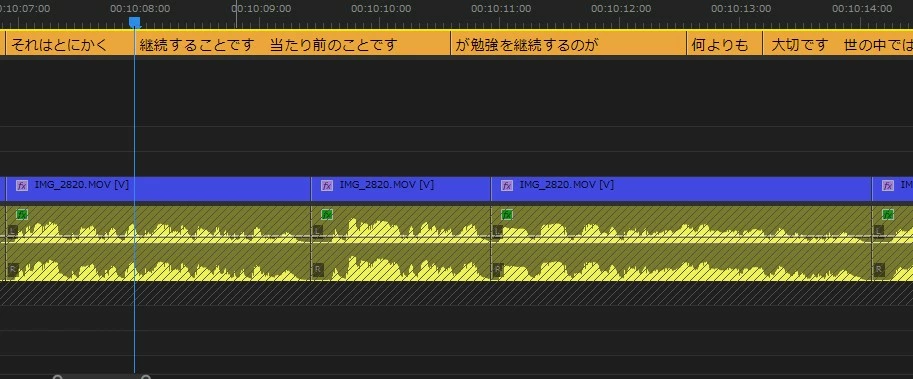
Ideally, they should be generated as follows.
-----------------

継続することです

当たり前のことですが

勉強を継続するのが

何よりも大切です

世の中では...

-----------------


Currently, this is corrected using caption splitting and merging, but this process alone takes a lot of time when it comes to videos with subtitles.


If this issue were addressed, it would eliminate the need to correct cuts by splitting and merging captions, and I am sure that this would greatly increase the editing speed.


Thank you very much for your consideration.

2 replies

Participant
September 27, 2023

Thanks for the consideration.

I am looking forward to that feature being added.


Until then, I will continue to edit in that manner.


Thank you again.

Stan Jones
Community Expert
Community Expert
September 27, 2023

I understand the concept. I would look for an option in the Create Captions dialog to add a yes/no check for "allow captions to span timeline edits in dialogue track."


For the time being, consider the following workaround possibility.


You can Create Captions that are essentially one word by setting the Max Characters to the minimum of 7, the minimum time to 1.2 seconds, and single line. Such captions appear to never cross an edit. I then tested 20 characters, and none of them crossed my arbitrary cuts.


Drag select groups of captions in the timeline and then click the merge icon in the Text Panel. Or assign the unassigned "merge selected segments" timeline shortcut (I use Ctl+Alt+U).  Easier than splits where you have to edit the duplicate test in each split caption.


Stan