
Improve Error Code 39 with clear disk space and export failure diagnostics
Feature Request: More Descriptive Export Error Messages and Disk Space Diagnostics
Hello Adobe Premiere Development Team,
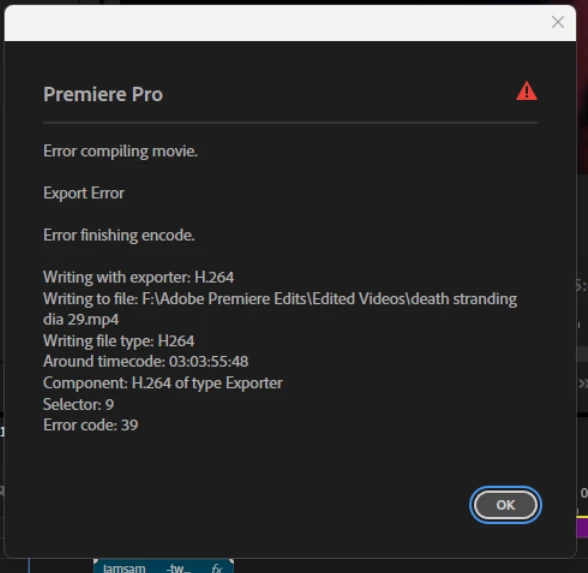
I would like to suggest an improvement to Premiere Pro's export error reporting, particularly for Error Code 39 (Error compiling movie / Error finishing encode).
My experience:
I recently encountered repeated export failures while rendering a 3-hour gaming video for YouTube.
My configuration:
-
Windows 11 26H2
-
NVIDIA GeForce RTX 4080 Super
-
NVIDIA Game Ready Driver 617.42
-
H.264 Hardware Encoding (NVENC)
-
2560×1440, 60 FPS
-
Approximately 83 GB estimated output size
-
Export destination: NTFS drive (F:)
Premiere would spend approximately 40 minutes encoding the video, only to display Error Code 39 at the very end of the export.
The resulting MP4 appeared to have the correct total duration but could not be played completely.
I initially suspected corrupted OBS recordings, NVIDIA driver problems, or hardware encoding issues.
What resolved the problem:
My destination drive originally had approximately 155 GB of free space.
After removing old exported videos, I increased the available space to approximately 2.38 TB.
I then exported the exact same Premiere project using the same H.264 Hardware Encoding settings and NVIDIA driver.
The export completed successfully without any errors.
This strongly suggests that storage availability or file-writing conditions contributed to the failure, although I cannot confirm the exact underlying cause.
My suggestion:
Please consider implementing more descriptive error messages and proactive storage checks during export.
For example:
"Export could not be completed. A potential storage or file-writing issue was detected. Please check available space on the destination and temporary storage drives."
Additional improvements could include:
-
Checking available disk space before large exports.
-
Displaying warnings when available storage may be insufficient.
-
Showing required and available storage estimates.
-
Distinguishing storage errors from GPU, codec, and encoding failures whenever possible.
-
Providing actionable troubleshooting recommendations instead of generic error codes.
As a content creator, I lost considerable time repeating long exports because Error Code 39 did not provide enough information to identify the issue.
Clearer diagnostics would greatly benefit editors and content creators working with long-form videos.
Thank you for considering this feature request!


 AdChoices