



Averdahl
Community Expert
Community Expert
February 3, 2026
Open for Voting

Improvement to Sequence Index

  • February 3, 2026
  • 1 reply
  • 44 views

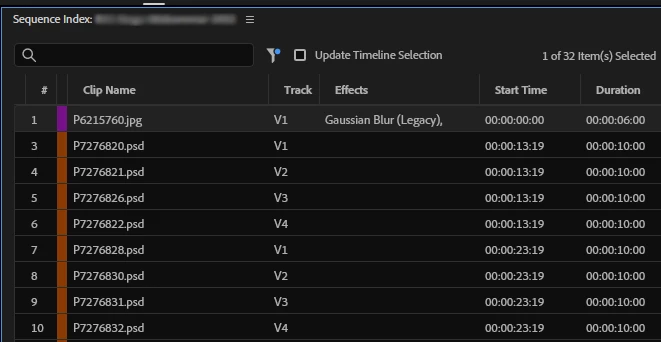
The Sequence Index is great for finding missing/offline effects but at a glance it seems that it missed the majority of the clips i am looking for. It lists only legacy filters such as Gaussian Blur (Legacy) in the Effects column but for offline filters such as Filter Offline (RGB Curves) the Effcts column is blank.

It finds the clips, with the orange label color on the attached image, and for me that already knows that those clips are the ones i am looking for it is easy. If i don´t know i would probably miss that all clips have the Filter Offline (RGB Curves) on them, the clips i am actually are looking for.


In Search Index Options i have filtered Effects Missing since i am looking for missing effects and offline effects such as RGB Curves in old projects.

Please inklude Offline Filters as well in the Effect column. :)


    1 reply

    Ann Bens
    Community Expert
    Community Expert
    February 3, 2026

    Might be due to RGB curves no longer is not missing but no longer available in the program.

    Averdahl
    Community Expert
    AverdahlCommunity ExpertAuthor
    Community Expert
    February 3, 2026

    True, but since Premiere throws an error message that informs that video filters are missing when i open old projects it would be nice to being able to see them in the Sequence Index list as well though they are no longer available in Premiere.

    Premiere knows that they are there and when we at last get a feature that easily can find them those should be there as well, imho.

    This would make cleaning up old project so much easier if one can see the names of all missing effects and not just some of them in the list inside the Sequence Index panel. :)