
Participating Frequently
Nov 15, 2026 2:13 PM UTC
Needs More Info

In Premiere 27.0 there is no way to turn off the effects thumbnials

Since updating to Premiere 27.0, the Effects panel shows a large thumbnail for every effect, and I can’t find any way to turn this off.

The thumbnails take up a lot of space. In a narrow docked panel I prefer to work on the effects names (I know what each effect does) instead of seeing distracting thumbnails. For audio effects it’s even less useful, because every thumbnail is the same speaker icon and shows nothing about the effect.

Request: please add a “Hide thumbnails” toggle to the Effects panel. A thumbnail size slider would also help.

The previews are nice for people discovering effects, but editors who already know what they need should be able to switch them off.

This breaks a basic usability principle (Nielsen’s ‘flexibility and efficiency of use’): a UI should serve both novices and experts, and here experts lost the minimalistic and clean list view with no way to opt out.
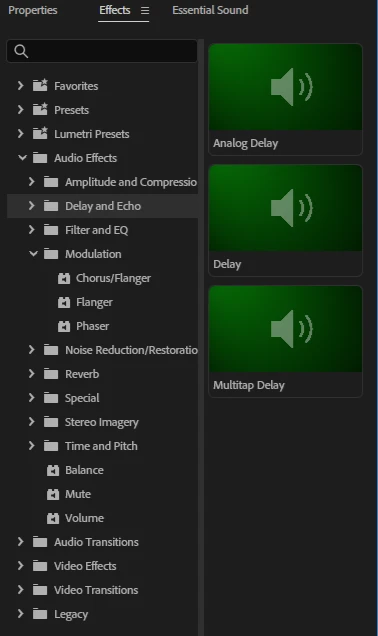
 

Version: Premiere 27.0, Windows 11

​

​

    This topic is closed to new replies. Start a new post to keep the conversation going.

    4 replies

    Community Manager
    Nov 20, 2026 7:10 PM UTC
    Updated idea statusOpen for Voting→Needs More Info

    Idea merged into:

    All the votes from this idea have been transferred. If you are just coming to this discussion, please upvote there. This discussion is closed.

    Thanks,
    Kevin

    Translate
    natural_view6893
    Participant
    Nov 19, 2026 4:53 PM UTC

    I used to be able to slide the thumbnail panel to the side so it wasn’t an issue but now it’s forcing itself to stay and making it impossible for me to read the effect names. This is genuinely making it much harder for me to use the program. I use a lot of effects so have all the names in one big list, I could use presets quickly cause I knew where they are, but the thumbnails are so much bigger with images that are just distracting. This needs to be made into a separate window that can be disabled.  

    Translate
    Community Manager
    Nov 16, 2026 2:10 PM UTC

    Hi MJaskulski,

    Welcome to the community!

    You can find an existing feature request for this idea here. Feel free to upvote it to show your support. The more upvotes a request receives, the more visibility it gets and the better it helps our product team understand user interest and priorities.

    Hope this helps!
    Thanks,
    Sumeet

    Translate
    Stan Jones
    Community Expert
    Community Expert
    Nov 16, 2026 3:05 AM UTC

    ​@MJaskulski 

    This needs to be a feature request. In the discussion of this in the Beta forum, no one suggested the option. I would upvote it.

    But the workaround is to just ignore them. If you don’t hover, they don’t animate. The left vs right space is adjustable, and the total width will be whatever panel group you have it in.

    Stan


    Translate