


Keyframes: "Add/Remove Keyframe" Button for all keyframed sub-effects
When animating a mask, I’ll often need to add a keyframe for multiple effect variables at once for multiple frames (over minutes of footage).
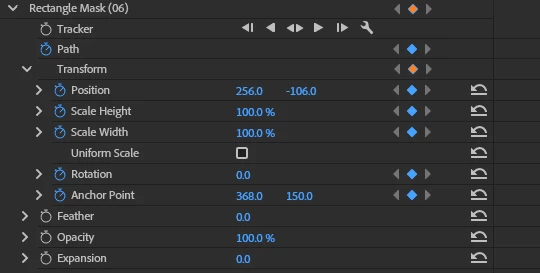
Rather than click each variable individually per frame, I’d really like a “Add/Remove Keyframe” button for each grouping that adds/removes a keyframe for all sub-variables within that group.
In this pic, I’ve edited in these buttons for the Rectangle Mask and Transform groups (orange) to show what it’d look like. As it is now, I have to manually click the buttons for Position, Scale Height, Scale Width, Rotation, and Anchor Point if I’ve moved the mask and need to store these positions at this keyframe. I’d rather be able to click the button on the Transform group or even the Rectangle Mask group to add the keyframe for all the animations grouped below it.
It might also be good if we could assign a keyboard shortcut to this, which would show as a keyboard icon next to that button, and even drag-n-drop that icon representing that keyboard shortcut from variable to variable to show which button that shortcut is currently assigned to.
 AdChoices