


Known Participant
December 16, 2025
Open for Voting

let us drag and draw rectangle masks

  • December 16, 2025
  • 4 replies
  • 240 views

I want to draw a mask.

I click on the rectangle icon.

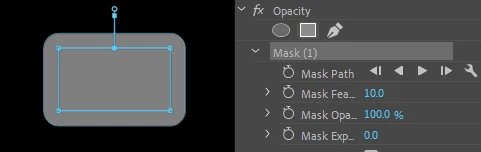
A rectangular mask appears. Nice.

Wait, it's a fixed size. Why this size? Nvm, I'll just resize it.

Where's the handle? I suppose it's that rectangle thingy. Unusual.

Wait, why is it making it all blurry? Maybe the other handle.

Nice, it's resizing. Wait, why are the edges rounded? I never asked for that.

Let's look for more... Nope, there's no option. I have to resize it by hand.

This is very tedious. Especially when you do that dozens of times a day for weeks, months, years.

There's a super easy fix : just switch from "on click, rectangle is spawn" to "on click, cursor changes into rectangle icon, then user can draw the rectangle mask the size he wants".

Then, feather and angle roundness can be adjusted via mask options.

Why not?
DeeS_2-1765850243776.png


4 replies

R Neil Haugen
Legend
December 16, 2025

I would suggest understanding the nature of the professional video apps ... for the last 30 years, it has been assumed the user had training and assistance in professional workflows. So the apps had complex and complicated functions, that the users wanted total manual control of ... and that is how the apps were designed to function. 


For professionals to use.


The prosumer video apps were built the other way ... to make things as simple for the users as possible. As much automation as possible. (Which was total anathema to most pro users btw.)


Over the last five years or so the differences have diminished, their aren't nearly the plethora of assistant editors prepping jobs, and time is more critical than ever. So there is nearly a 180 degree difference in the needs for the working of many things.


Hence the pro apps are getting rebuilt. And the new masking is amazing, and I've worked with it some. The tracking with it is past what Ae's rotoscoping could do 18 months ago.


Changes are happening at an amazing speed for long-time users, some of whom are really ticked that the processes they have muscle memory for over long use are now completely different. And others complain things aren't changing immediately.

Everyone's mileage always varies ...
Participating Frequently
December 16, 2025

In the Beta builds, there is new Masking functionality that may address some of your asks. Masking has been moved to the Tools panel and you draw Masks in the Program Monitor. You can then double-click on the Mask to enter (and leave) bounding box mode to resize and rotate the Mask.


More info can be found at:

Now in Beta: New Masking Tools

https://helpx.adobe.com/premiere-pro/using/object-masking.html


Feel free to provide any feeback in the Beta forum post.

Dee-SAuthor
Known Participant
December 16, 2025

If something can be done extremely simply, but the user has to dig for intricate and non-intuitive ways, is the user really the problem?

R Neil Haugen
Legend
December 16, 2025

Apparently you haven't had training in their masks ... you can size via keyboard shorts even. Create a bounding box around multiple points and move them together ... there are a number of ways to change them.


Not always "intuitive" but they are there. The new masking feature in the public beta though is a huge improvement.

Everyone's mileage always varies ...