



AndrewTheGreat
Known Participant
November 24, 2023
Open for Voting

Make keyframe handles pin horizontally upon holding Shift

  • November 24, 2023
  • 20 replies
  • 3512 views

Hi, guys. The porblem I've suffered for ages seems to bother no one but me since I've found no such posts here in the Community.

There are keyframes in Premiere Pro and they have handles. In After effects if you hold the Shift key on your keyboard, the handles pin to the horizontal or diagonal position so in case of moving the Scale keyframe to interpolate it more gradually - that is ease in\out more - you don't go above or below the current value. 

In Premiere Pro the shift key does not work and whilst the position key is pinned to the lower part of the keyframe region and cannot be moved below it, the scale keyframes float as if not attached, see the video below.
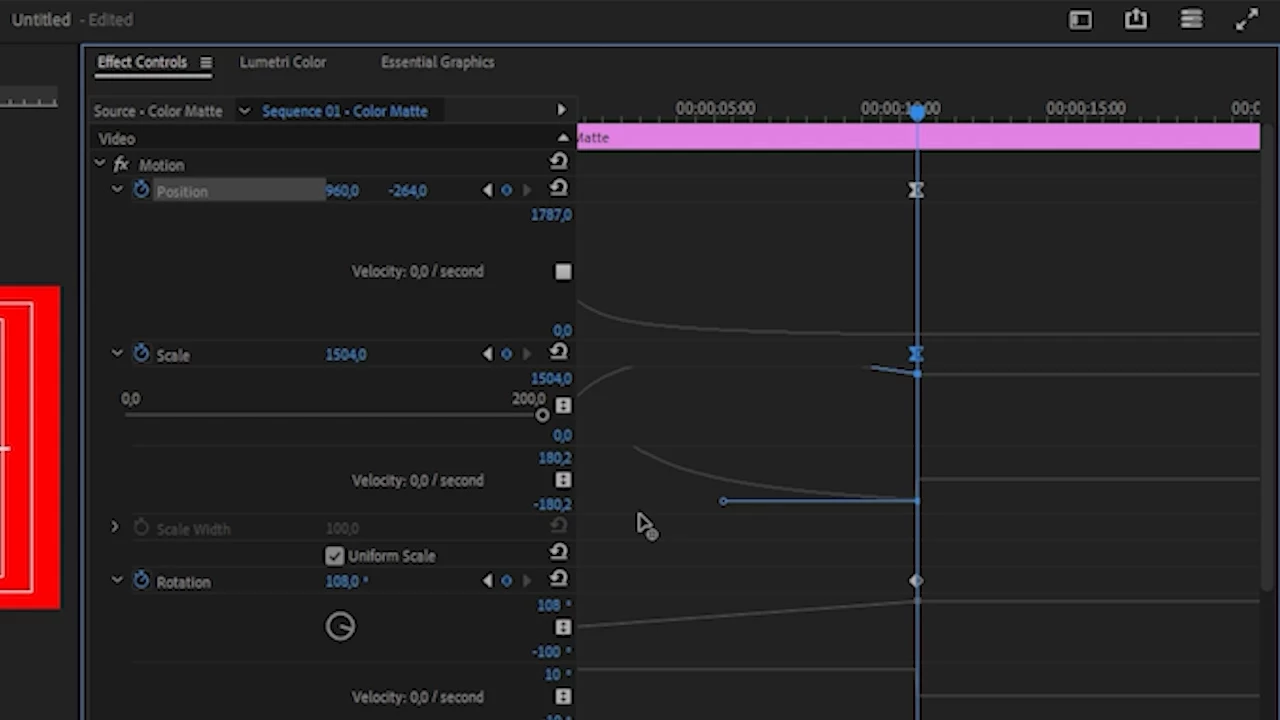
 

The handle goes up and down from its starting point once you move it to the left to make the ease "easier". And if you want it have the same value you keyframed it you either have to use a magnifying glass and a ruler or somehow bring it to the same level visually.

Isn't there a chance Adobe will introdice some kind of fix for this, so when you hold shift, the handle remains on the same horizontal line and does not change its value, when you move the keyframe handle?

20 replies

Participant
May 2, 2025

This would be greatly appreciated as someone with a shaky hand. This frustrates me so much cause I use a lot of easing in my videos and I can't use AE cause of hardware limitations

Participant
February 5, 2025

Please Please Please make this a thing

R Neil Haugen
Legend
February 4, 2025

I've wanted splines for all keyframes and curves tools in Premiere for ever ... sigh.

Everyone's mileage always varies ...
MyerPj
Community Expert
Community Expert
February 4, 2025

Yep! 

(and Splines are cool!)

Participant
February 4, 2025

For the love of all that is holy, please implement this!

AndrewTheGreat
Known Participant
February 4, 2025

Yeah, and in comparison to DR graphs built in right into the timeline, Premiere Pro just looks antique not to have it at all:


Participant
February 4, 2025

After Effects has such an intuitive graph editor, and surely Adobe can do better!

Participating Frequently
January 17, 2025

yes please!

_nicdean
Community Expert
Community Expert
December 8, 2024

+1000


#innovationweek

Participant
October 17, 2024

This is my biggest pet peave in Premiere. I can't stand manually adjusting these keyframes compared to After Effects, and switching back and forth is a pain for long projects. Please Adobe, it could be so much better, so easily.