



AndrewTheGreat
Known Participant
November 24, 2023
Open for Voting

Make keyframe handles pin horizontally upon holding Shift

  • November 24, 2023
  • 24 replies
  • 3654 views

Hi, guys. The porblem I've suffered for ages seems to bother no one but me since I've found no such posts here in the Community.

There are keyframes in Premiere Pro and they have handles. In After effects if you hold the Shift key on your keyboard, the handles pin to the horizontal or diagonal position so in case of moving the Scale keyframe to interpolate it more gradually - that is ease in\out more - you don't go above or below the current value. 

In Premiere Pro the shift key does not work and whilst the position key is pinned to the lower part of the keyframe region and cannot be moved below it, the scale keyframes float as if not attached, see the video below.
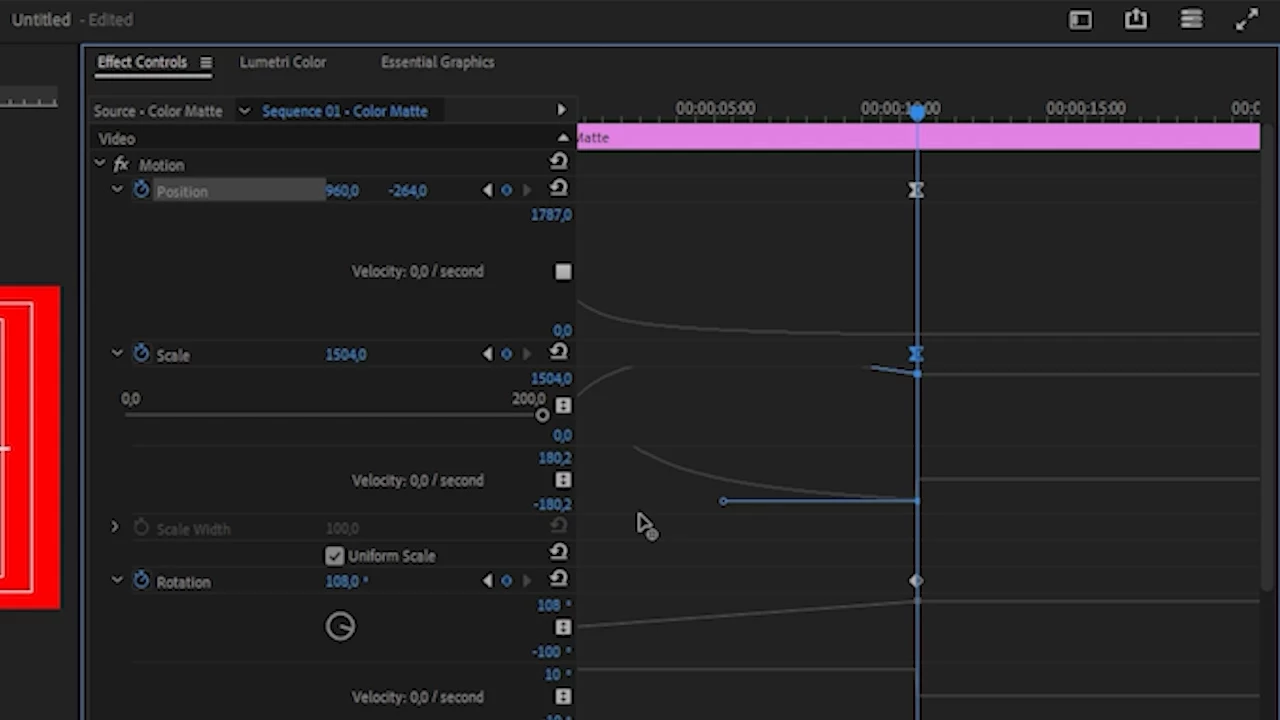
 

The handle goes up and down from its starting point once you move it to the left to make the ease "easier". And if you want it have the same value you keyframed it you either have to use a magnifying glass and a ruler or somehow bring it to the same level visually.

Isn't there a chance Adobe will introdice some kind of fix for this, so when you hold shift, the handle remains on the same horizontal line and does not change its value, when you move the keyframe handle?

24 replies

Known Participant
April 7, 2026

This would be an incredibly valuable feature. Currently it’s very easy to accidentally have the animation go past the value of the keyframe. Being able to manually type the velocity could also be helpful as another option, whether fully necessary for Premiere is anther question.

jtanimator
Participant
April 1, 2026

This is SUCH a basic feature that it’s genuinely maddening they refuse to address it. it’s barely even a feature, just a function that would be consistent with EVERY other interface control they’ve built the app around.

gavin_6746
Participating Frequently
April 1, 2026

It’s a “Creative Suite” for a reason. If Adobe gave functionality like this to Premiere it continues to diminish the value of using AE. I don’t think adding this would do that, but I’m assuming that’s why they haven’t added this among other features.

AndrewTheGreat
Known Participant
April 1, 2026

It’s nonsense. AE is a mograph app, it should have nothing to do with video editing. As well as - like Adobe philosophy implies - Premiere has nothing to do with motion graphics. But they both do have the rival’s capabilities! So why not make mographists experience better and video editors experience better? Don’t you think it’s a logical idea? If I’m no mographist, why should I use AE in the first place? The most humiliating part is you know what… Humiliating for the almighty corporation Adobe is. It’s the fact that since AE video capabilities are so miserable that a guy from the internet makes a plugin which adds a full featured Premiere Pro timeline to it (google for Railcut) which runs and feels smoother and more feature-rich than the original Premiere Pro timeline! And another guy has to make such a tiny simple quality of life feature as locking the Y axis while holding a button, the feature AE - a non NLE program - has. What. Is. Freaking. Going. On !? 

Adobe say they listen so why not listen to everyone, not just some product-ads-oriented guys and bloggers who do not even work gas video editors?!

Stop trying to edit and EDIT!
AndrewTheGreat
Known Participant
March 31, 2026

Well, I made a plugin and it’s free. When loaded, you hit a hotkey combination and it blocks the Y axis. Hit it again and the axis is unblocked. You can change the combination, but you need to manually type it in letters, like alt + F (in letters!)

Download it here https://drive.google.com/file/d/189pDJlZRXJa-9FoYOrbwOYpZHbNpxjpd/view?usp=sharing

PS: made in ChatGPT in like 2 minutes.

https://drive.google.com/file/d/189pDJlZRXJa-9FoYOrbwOYpZHbNpxjpd/view?usp=sharing

Stop trying to edit and EDIT!
gavin_6746
Participating Frequently
April 1, 2026

Totally fair, if all you need is a basic lock, that works 👍


Keyrails is more about making it feel native to Premiere: hold to activate instead of toggle, auto-snapping to the handle, no friction while dragging, easier hotkey assignment, works on Mac/Windows.


It’s one of those things where you can totally DIY it! But the experience is pretty different if you’re using it day to day.


gavin_6746
Participating Frequently
March 29, 2026

Kind of late to this, but I was tired of this too and made a tool to fix it! I mapped ⌘ as my hotkey and I think it’s pretty awesome. 
https://keyrails.app/

AndrewTheGreat
Known Participant
March 31, 2026

A paid for plugin. For a basic feature. It’s not awesome

Stop trying to edit and EDIT!
gavin_6746
Participating Frequently
April 1, 2026

A cheap plugin. Fixing an annoying problem. I think that’s pretty awesome :)

Participant
May 2, 2025

This would be greatly appreciated as someone with a shaky hand. This frustrates me so much cause I use a lot of easing in my videos and I can't use AE cause of hardware limitations

Participant
February 5, 2025

Please Please Please make this a thing

R Neil Haugen
Legend
February 4, 2025

I've wanted splines for all keyframes and curves tools in Premiere for ever ... sigh.

Everyone's mileage always varies ...
MyerPj
Community Expert
Community Expert
February 4, 2025

Yep! 

(and Splines are cool!)

Participant
February 4, 2025

For the love of all that is holy, please implement this!

AndrewTheGreat
Known Participant
February 4, 2025

Yeah, and in comparison to DR graphs built in right into the timeline, Premiere Pro just looks antique not to have it at all:


Stop trying to edit and EDIT!