
Known Participant
November 6, 2024
Open for Voting

Media Encoder - Creating multiple threads on each Preset - WHY??????

  • November 6, 2024
  • 3 replies
  • 305 views

1. I drag a series of video files to Media Encoder.

2. I wait ages for it to import all video files.

3. The original preset command is to create an exact copy of the high bitrate 4k file like anybody is doing that.

4. I select all, right click the PROXY PRESET that is used most often by most people in all realms.

5. it creates 184 NEW COPIES NEXT TO THE ORIGINAL COPIES.

6. There is no way to select only the high bitrate copies to delete those, leaving only the proxy files.

6.5. Individually select each and every high bitrate copy, and delete. You still haven't even started the proxy workflow yet.

7. ????

8. Pay Adobe hundreds of dollars every year.

Why?
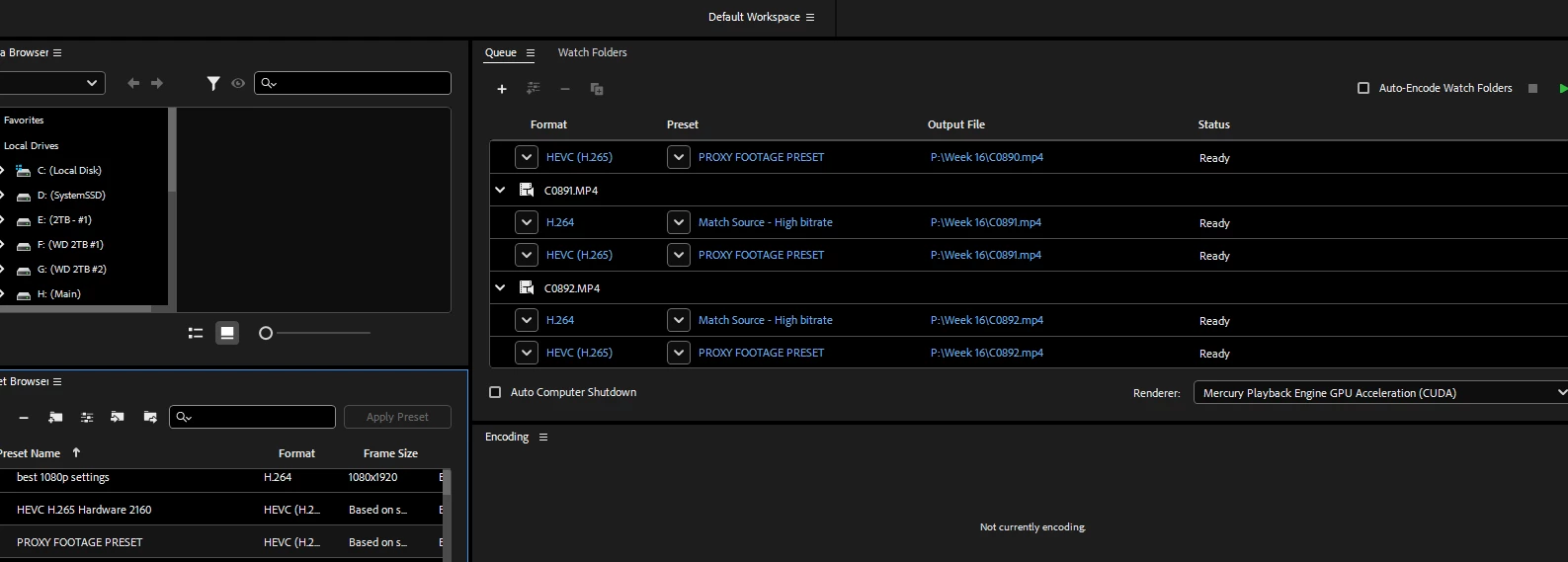
Like what is this accomplishing?

3 replies

Known Participant
November 6, 2024

@R Neil Haugen I like to create proxies before the project begins; because my machine is too slow to cull footage in full resolution (even at 1/8th or 1/16th depending on HDD/SSD speed) so doing proxies in the beginning is my way of keeping some workflow while I save for a better machine.

You are correct, that is a great workflow but my machine is not able to handle that. I have to create proxies to function with my i7-9700F and 2080Super.

R Neil Haugen
Legend
November 6, 2024

No clue why you're working that way.


Select all  the original media in the bin in Premiere.


Right-click, "create proxies", choose the preset you want.


Get back to work while Me makes the proxies.

Everyone's mileage always varies ...
Known Participant
November 6, 2024

This is appropriate behavior of this software? Really?