



Unicodia1
Inspiring
November 23, 2018
Open for Voting

Multi-Camera Sequence Color Label Entire Video, and Have That Color Show in Edit

  • November 23, 2018
  • 4 replies
  • 2779 views

Hello,

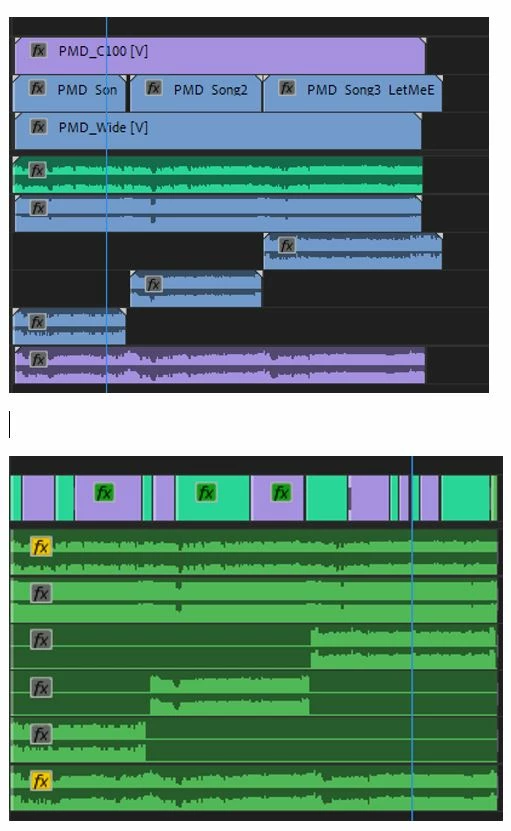
For anyone out there who is using the multi-camera editing, is there a way to have the color label show up in individual cuts for the Multi-Camera sequence?  I added an image below to show one of my recent sequences.  The bottom part of the image shows mostly green, and that is the Multi-Camera Sequence.  I did all of that color labeling.  In this case, the video was only around 10 minutes.  The real benefit would be in longer videos.

I'm using shortcut keys for the labels, and so that is quicker.  But, it would nice for this to be automated.  One thing I figured out is that I can use unsharp mask on a video, and it will show red, as if needing to render.  This helps identifying the cuts, and I can go in and color those for the final run.  But, automatic color labels would be ideal.

Thanks,

Steve
4 replies

Known Participant
May 19, 2025

I too can't see a difference in the beta for multicam labels. 

The clips in the timeline still reflect the multicam label, rather than the underlying source clip label.

An analogy is the timecode overlay - this shows the underlying source clip timecode, rather than the multicam sequence timecode. Source clip labels should have an option to work this way too - so we can see the balance of the cut, or search and add effects to camera 4 etc etc.


Participant
May 19, 2025

I still can't see any changes. I can assign colours within the multicam sequence, but when I change between cameras, those don't reflect on the main multicam sequence. It's all just the same colour. 

Participating Frequently
February 3, 2023

2023 and still wishing for this feature! any updates?

rogermtv
Participant
January 18, 2025

I think 2025 and still no!

Kevin J. Monahan Jr.
Community Manager
Community Manager
January 23, 2025

I moved this older post to Ideas. Sequences can now be labeled. Is that working for you in Beta yet? Let me know.


Thanks,
Kevin


Kevin Monahan - Sr. Community and Engagement Strategist – Adobe Pro Video and Audio
caroline_edits
Community Manager
Community Manager
November 27, 2018

As of right now I do not know of a way to automatically color-label cuts. I suspect it's not a feature because people have different associations with different colors. I know I have meanings to my color-coding that nobody else does!

Maybe a universal color-coding key would be useful! You can submit feature ideas here: https://adobe-video.uservoice.com/forums/911233-premiere-pro

Premiere Pro: Hot (3326 ideas) – Adobe video & audio apps

Our engineers check that page regularly for ideas on what users want and need! Feel free to suggest many different ideas; we really appreciate the feedback!

-Caroline

Unicodia1
Unicodia1Author
Inspiring
November 27, 2018

Hi Caroline,

Thank you so much for your response.  However, I was thinking of something slightly different.  You can see in the jpg I attached that it has two sections.  You can see the individual cameras source sequence, and one separate audio in the top section.  Below that, you can see the multi-camera sequence.  I had to add labels to both sections manually.  What I was hoping for was that the change I made to the area where you can see the source video and audio files on the timeline, would automatically appear in the multi-camera sequence after I selected the cut.  So, I was hoping that as I made a cut, it would know that I chose camera 1, and automatically could mark that one cut with the color I had added to the source video and audio files sequence.  What happens is that each cut in the multi-camera sequence stays green by default, unless I go in and manually label them. 

Thanks for the tip on Hot Ideas section of the forum.  I will resubmit this post there.

~ Steve

caroline_edits
Community Manager
Community Manager
November 27, 2018

Oh, I see what you mean! Wow, that's an even better idea than the one I THOUGHT you were suggesting! Hilarious.

Please do submit it and post it back here so I can upvote it as well!

-Caroline