
Inspiring
November 27, 2024
Open for Voting

New crop tools don't allow you to click and drag the crop window

  • November 27, 2024
  • 4 replies
  • 322 views

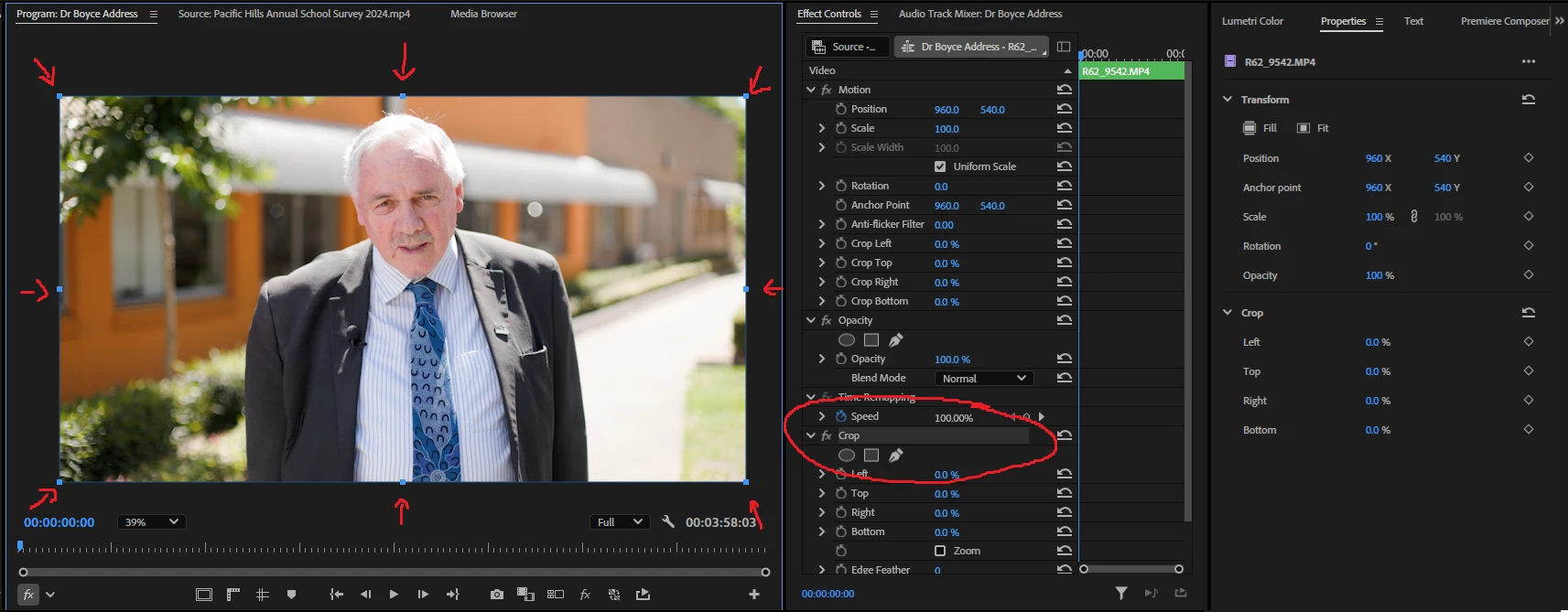
Although I appreicate that the crop tool has been made a default option in Premiere, it's still missing the core useful feature of the original crop effect - being able to select the effect, and then drag in from one of the 8 blue boxes around the image to crop. This is so much easier than changing each of the 4 left, top, right, bottom parameters individually for most use cases.


Please add this functionality to new crop tools.


4 replies

Inspiring
November 27, 2024

Ahh I see, thank you!

Participant
November 27, 2024

Thank you for this!

MyerPj
Community Expert
Community Expert
November 27, 2024

BTW: The button is Toggle direct manipulation and the arrow is to select the direct manipulation.

MyerPj
Community Expert
Community Expert
November 27, 2024

They're there. On the program monitor with the clip selected in the timeline or a double-click on the monitor. On the lower left corner, there's a button and a drop-down arrow, select the Crop in the dropdown arrow, then make sure the (now) crop button next to it is on/highlighted, then you'll see the crop selectors.