


Open for Voting
No type character setting
In Adobe Photoshop, there is a type setting that allows the user to select a version/character encoding of the type font in usage, for instance, to switch from Russian to Bulgarian Cyrillic.
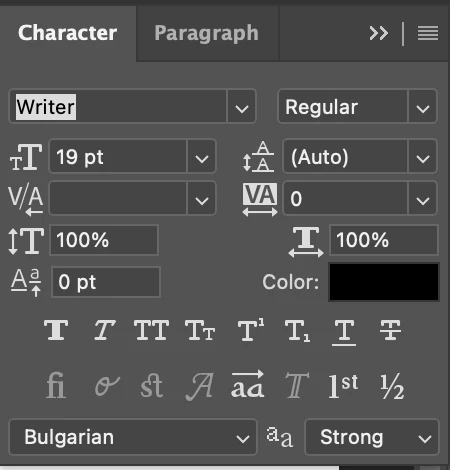
No such thing is available in Premiere Pro (or in After Effects, for that matter). This makes a simple task like exporting a video with captions much more tedious. I found a partial solution that requires the usage of AE as well.
You open PS, type your text and change the character encoding from there.
You copy that text and paste it as a text layer into AE. The encoding is preserved.
However, this doesn't happen when you paste copied text from PS to Premiere. The encoding remains the default. A setting to change it would be much appreciated.
 AdChoices