
Legend
May 1, 2024
Open for Voting

Numbers in the Effect Controls panel should have a built-in calculator, like in After Effects

  • May 1, 2024
  • 5 replies
  • 923 views

In After Effects, clicking a number in the Effect Controls panel, in the Timeline, or the Properties panel, gives you a built-in calculator. Typing "360/12" will calculate the number 30. Typing "1920/4" will calculate the number 480. Typing "1920-50" calculates the number 1870. Etc. 
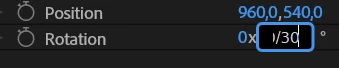


This is a very efficient way to rotate, place or scale a layer to a specific value! A time saver! The built-in calculator makes it super-easy to place logos or graphics an exact amount of pixels from the lower right corner, place picture-in-picture layers in the correct position, etc..

We need this functionality in Premiere pro too! Pretty please!

5 replies

Ann Bens
Community Expert
Community Expert
May 2, 2024

Might find this request somewhere in Adobe's archives.............

Upvoted.

Kes Akalaonu
Inspiring
May 1, 2024

Yes please!

R Neil Haugen
Legend
May 1, 2024

Oh all sorts of YESSSS!!!!!!!!!


I'm with Jarle & Christine et al on this ... and folks, anything that has both Jarle and Christine pushing it, should be a "just DO it!" ...they are the two most efficient editorial machines I've ever met ...

Everyone's mileage always varies ...
Participating Frequently
May 1, 2024

Yes. Approve. Support. hand held high!

Christine Steele
Participating Frequently
May 1, 2024

I concur! Thanks for posting this request Jarle - it has my UpVote 😎

Keep Creating...