

rachelcenter
Legend
June 15, 2024
Open for Voting

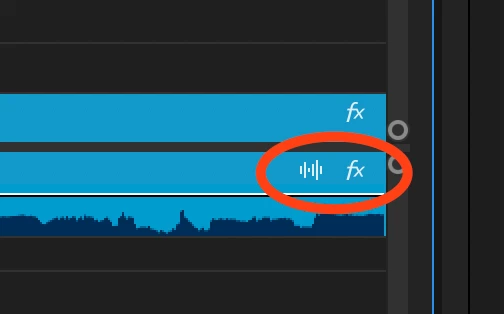
please remove the clickable buttons on the audio tracks

  • June 15, 2024
  • 8 replies
  • 914 views

please remove the clickable buttons on the audio tracks (the waveform button and fx button). these were not clickable on the last version. and it makes it really tough to grab clips and drag then elsewhere or copy and paste them if that button is acidentally clicked. I cant emphasize enough how much of an inconvience this add is. I cant tell you how much this hinders the process of moving clips around quicker/quickly. It gets in the way.
8 replies

rachelcenter
Legend
July 9, 2024

@Kevin-Monahanwhere exactly is the premiere pro ideas page? I went to this link and the header says "Welcome to the Feature Request and Bug Report Submission Form"  but i dont see any way to submit ideas to this page.


https://www.adobe.com/products/wishform.html

rachelcenter
Legend
July 8, 2024

whatever you just circled in red is not the issue or how to recitfy it. the last version of premiere didnt make the FX into a button so there was no issues dragging clips. and it was great because you could see the word "FX" on your clips on the timeline and know that there were effects there, but the "FX" was just simply text, it wasnt a button so it didnt create issues dragging the clips around. Premiere needs to go back to the fx setup from the last version where you can see "FX" text on your clip but its not a clickable button.

Participant
July 8, 2024

Actually the feature already exists so this post should belong to Help & Support or something like that.
Although I would suggest to add the ability (in the same drop down menu) to hide those :

Participant
June 24, 2024

Thanks you so much OMG

Kevin J. Monahan Jr.
Community Manager
Community Manager
July 8, 2024

Hello @rachelcenter,

Thanks for the feature request. I have moved your post to the Premiere Pro Ideas. I hope that's OK. Please take care!


Thanks,
Kevin

Kevin Monahan - Sr. Community and Engagement Strategist – Adobe Pro Video and Audio
rachelcenter
Legend
June 16, 2024

i liked the badges in the previous update of premiere because it showed you if your clip had color correction or not. but now in this version, with badges on, it becomes an annoying clickable button that hinders moving clips around. so you turn off badges, and you lose a helpful (visual) feature. shrug.

Kes Akalaonu
Inspiring
June 16, 2024

rachelcenter
Legend
June 15, 2024

I'll try that and see if it fixes the problem. Sounds promising.

Kes Akalaonu
Inspiring
June 15, 2024

You know you can turn off Show FX Badges and Show Audio Tag Types by clicking on the wrench tool right?