
Remove Timeline Artifacts clips from Text editing and improve Ai understanding of audio peaks.
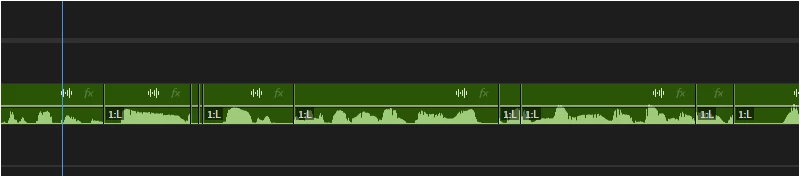
This screenshot was taken from a sound clip after it had filler words and pauses removed.
As you can see in the latest version of Premiere there is still the issue of single frame lengths of sound are still left from deleted transcribed words and sentences. This leaves random bits of sounds silent or full of soundwaves in the middle of a sequence where the expectation would be that when a word or sentences are deleted no sound clips remain. The detection of sound waves and silence needs to improve to avoid inaccurate cutting. This is not the 1st time I have mentioned this about text-based editing and its glitches. It has improved significantly, but there is still more to do.
Maybe analysing the clip can include user refinement where the noise floor and highest peak can be defined manually as well if that will help with the accuracy of the start or ends of peak detection. But the random single sound frames are very annoying. It makes the QC so much more tedious and time-consuming when using the software as intended instructed issues.
V.25
Win 11


 AdChoices