



TenTin
Known Participant
February 20, 2025
Open for Voting

Reorder Bins based on User Preference!

  • February 20, 2025
  • 4 replies
  • 766 views

Hi there,
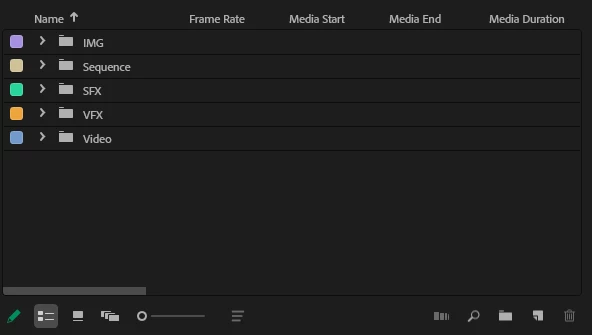
I'm curious why there isn't an option to reorder bins in the project panel according to user preference in the list view.
For example, why can't I put the "Sequence" bin at the bottom of the list?!
 

4 replies

TenTin
TenTinAuthor
Known Participant
February 21, 2025

🙏 ... 👍 ...

Kevin-Monahan
Community Manager
Community Manager
February 20, 2025

Moved to the Ideas forum.


Thanks,

Kevin


Kevin Monahan - Sr. Community & Engagement Strategist – Pro Video and Audio
Ann Bens
Community Expert
Community Expert
February 20, 2025

If I want my bins in a particular order I give them numbers.

Community Expert
February 20, 2025

In List View, the order of project items is based on the sort order of the selected column. In your screenshot, it’s sorting by the Name column. A common trick is to prefix bin names with numbers or special characters to control the order. You can also add numbers to another column and sort by that instead.


In Icon View, you can manually drag items around to arrange them however you like.

TenTin
TenTinAuthor
Known Participant
February 20, 2025

I understand how to sort items by columns, similar to the details view in Windows Explorer. I'm also familiar with the custom layout (manual layout) option in Icon view. However, I'm wondering why I don't see an option to reorder items according to user/my preference (in list view). Adding numbers at the beginning of the bins is the most nonsense solution!

R Neil Haugen
Legend
February 20, 2025

1) Yea, you've got a point.

2) As a practical user, I simply do what Paul, Ann, Jarle and others teach ... stopped worrying ... and got on with Life.


Yea, there's always annoying things like that.

Everyone's mileage always varies ...