
DJP2014
Inspiring
April 21, 2023
Open for Voting

Reorder/rearrange export presets

  • April 21, 2023
  • 3 replies
  • 319 views

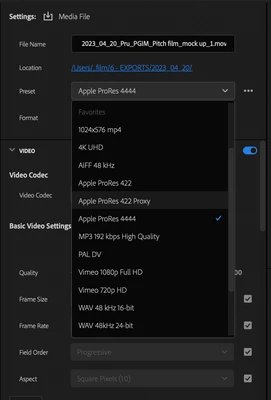
Being able to create custom export presets is great but currently they're listed alphabetically, which often puts presets used the least at the top (and vice versa).


Love to be able to drag presets into a custom order. That way we could group presets according to use (vimeo/audio/proxy etc.) and put the ones used most frequently at the top.


3 replies

R Neil Haugen
Legend
April 22, 2023

Totally understood!


Although I didn't add a number prefix to my presets, thankfully I've only got something like eight, so scrolling through is pretty quick. I did realize after doing this that adding the prefix ... either a number 1-9 or letter A-? would have organized them even more. 


And Jarle Leirpoll in his massive detailed tome on Premiere workflows and extreme customization possibilities does cover finding and removing all factory presets you simply wanna get rid of.


Jarle’s Book “The Cool Stuff in Premiere Pro


Neil

Everyone's mileage always varies ...
DJP2014
DJP2014Author
Inspiring
April 22, 2023

Thanks for the reply Neil. 

Yes, I've been doing exactly that, thing is I still end up with quite a long list of presets. 

I guess I could put them in a preferred order by numbering them. A real faff though especially as Adobe also hasn't included the ability to rename custom presets. Trying my hardest to like this export window but it's fighting me 😉 


Dan

R Neil Haugen
Legend
April 22, 2023

Taking some minutes to go through the full list, UNSTAR everything you'll never use, make your own detailed and named presets, starring them (now they are favorites) will get at least your own usable presets showing in a much shorter list, without all the built-in ones you'll never ever use showing.


Neil

Everyone's mileage always varies ...