



Elaskanator
Known Participant
April 26, 2020
Open for Voting

Resizing sequence ALWAYS warns that (nonexistent) preview files will be deleted

  • April 26, 2020
  • 1 reply
  • 4171 views

Can I turn this warning off? I have never even used the feature of Preview Files.
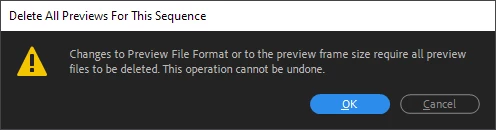
And can you please fix this bug? If there are no preview files, then there are none to delete.


Steps to reproduce:

  1. Create a new project
  2. Create a new sequence from footage (e.g. a single video file)
  3. Change the Frame Size under Sequence > Sequence Settings
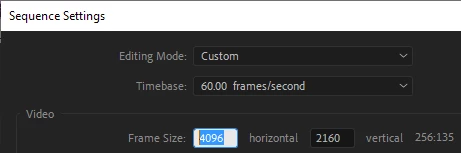
  4. Get warning message

1 reply

Legend
April 26, 2020

it's not a bug, it's a feature...  You can create a new sequence with your desired settings and then drop the clip into the sequence and avoid the warning.    And you can set to frame size or scale to frame size.  

Participant
January 6, 2025

I get the logic, however I definitely would not call it a feature- why not let users toggle this warning off in the future? Super easy to impliment. Practically speaking, this popup warning can become ANNOYING as hell if your workflow isn't as straightforward as your example^

Kevin J. Monahan Jr.
Community Manager
Community Manager
January 7, 2025

HI @JAK_EDITS, & @Elaskanator,

Thanks for the post. This sounds more like a feature request. I will move your feature request to the Ideas forum then. I will also upvote. Sorry for the frustration.


Cheers,
Kevin


Kevin Monahan - Sr. Community and Engagement Strategist – Adobe Pro Video and Audio