


Open for Voting
Ripple edit tool UI should be a combination of Premiere 2024 and 2026 styling
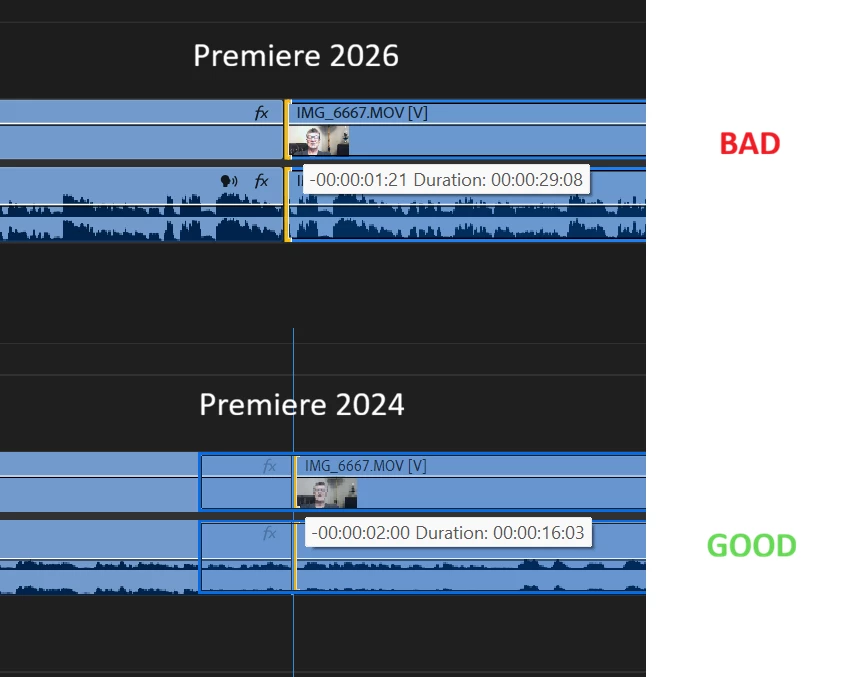
This video and photo is a comparison between the Ripple edit tool in Premiere 2026 and 2024.
I do like the new way you see the clip change in real time as you drag the edges left and right, but I hate when you’re grabbing the second clip and wanting to extend or decrease the size of it, you can’t see a visual preview of how much it will change that Pr24 does show with that blue bounding box.
Basically I’d like the real time increase/decreasing of the clip AND a bounding box to appear when changing the length so you know how much it’ll be altered.
It’s crazy how much it feels like guesswork when using Premiere 2026 to decrease a clips length using Ripple.
 AdChoices