

Det Scholz
Known Participant
June 21, 2024
Open for Voting

Seperate "Show Clip Markers" for video and audio tracks

  • June 21, 2024
  • 2 replies
  • 308 views

When working with markers that have a duration, marker info lay above audio waveforms in the timeline:
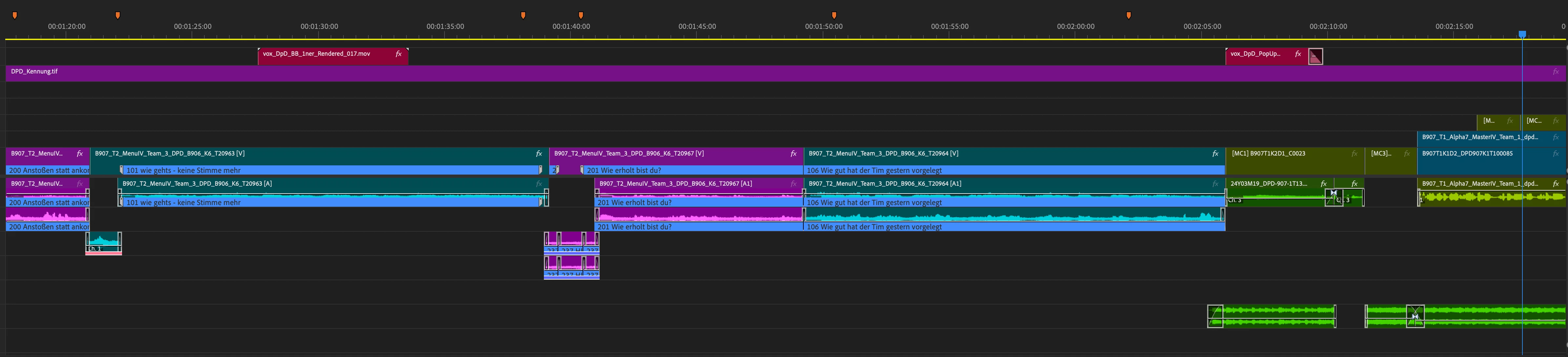


So it is difficult to see the waveforms even if you have a lot of audio tracks and track  height is limited. Disable "Show Clip Markers" isn't the option because the marker text include infos for editing.
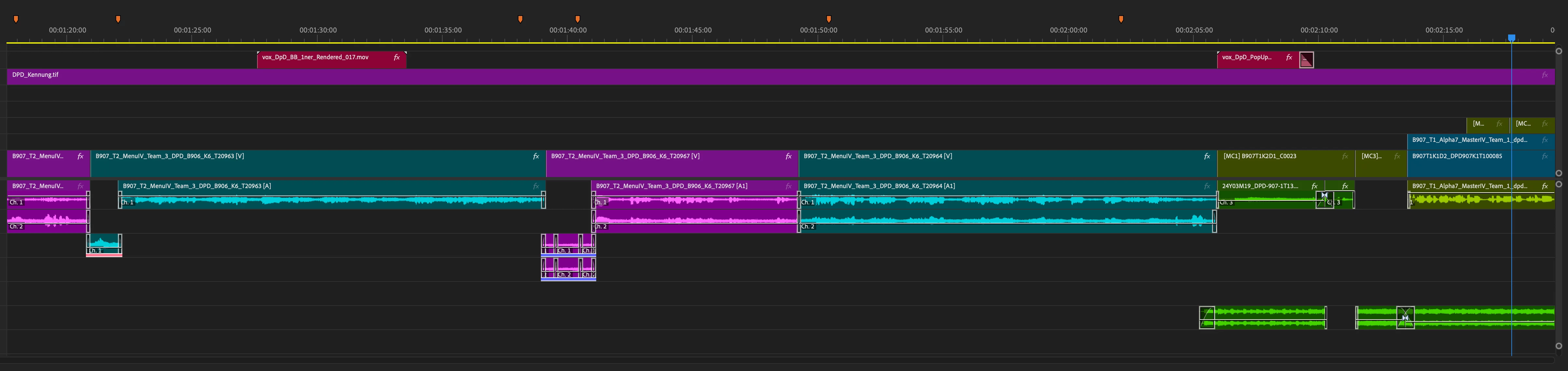
So it would be helpful when there a seperat options for video and audio tracks for showing clip markers in the timeline display settings.

There a already diffrent parts for video and audio.

2 replies

Community Expert
June 23, 2024

This should be implemented, or maybe make the markers bar a bit transparent. But I believe it's better to have the option to turn off audio markers separately.

Kevin J. Monahan Jr.
Community Manager
Community Manager
June 21, 2024

Hello @Det Scholz,

I'm Kevin, one of the moderators here. Thanks so much for the feature request. I hope the product team will grant this to you soon. Others on the thread, please upvote this request.


Thanks,

Kevin

Kevin Monahan - Sr. Community and Engagement Strategist – Adobe Pro Video and Audio