



Inspiring
December 5, 2022
Open for Voting

Slip edit using trim tool in Premiere Pro

  • December 5, 2022
  • 10 replies
  • 4242 views

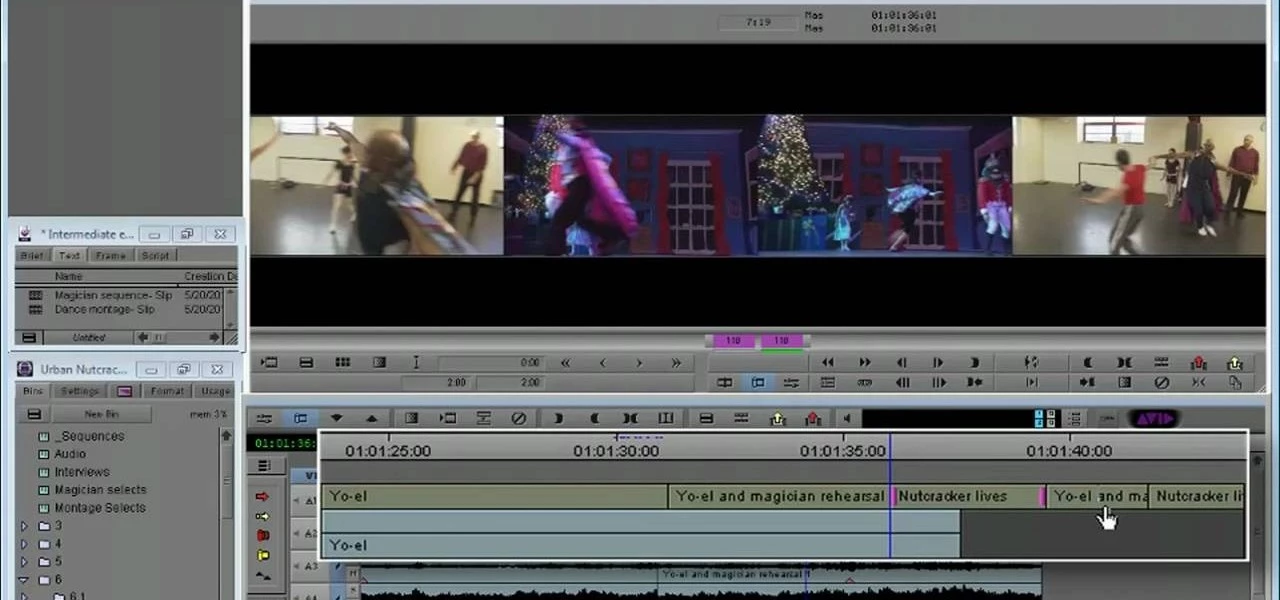
Is there a way to do a slip edit in Premiere Pro using the Trim tool, similar to how one might do so in Avid? It's something I need to do all the time, and the Slip Tool in Premiere gets the job done, but not in as easy to use a way as in Avid:
10 replies

Inspiring
February 23, 2025

Hello @Kevin-Monahan ! I think, and I posted a long time ago a Idea to make in PPro editing trim tools like in Avid MC(I mean real time pathcing targets while I am in Trim Mode ) and like in Avid then we editing with trim make a "Source panel" as a A-side and "Program Monitor" as a B-side trim sides, sometime, then Iam using a laptop and trimming, seeing what's happening on program monitor(espesially when we use slip tool or slide tool) a little bit hard)

KazuT
Inspiring
February 21, 2025

You're right, @Kevin-Monahan, thank you for consolidating the posts. I guess it's something where I keep running into situations where it would be super helpful.

KazuT
Inspiring
February 19, 2025

It would be SO helpful to be able to Slip using the Trim window. It's really funky and tricky and confusing trying to do it to the timeline with the Slip Tool; most of the time, I can't tell which direction I need to go to get the result I want. Basically, I may just want to slip the shot one frame to the right. The workarounds to do this seem, well, like workarounds (like using the red Trim tool on the left of the shot, trimming one frame to the left, selecting the shot, Nudging it one frame to the left, then using the red Trim tool on the right side of the shot and trimming one frame to the right). 

Kevin-Monahan
Community Manager
Community Manager
February 21, 2025

Didn't you already make this feature request? Or was that your alter ego @KazuTa? I'll merge the two. Regardless, make sure your colleagues upvote.


Thanks,
Kevin


Kevin Monahan - Sr. Community & Engagement Strategist – Pro Video and Audio
David J. Cain
Participating Frequently
February 22, 2023

Hi Kevin,


Thanks for supporting this feature. In my opinion Media Composer is not nearly as intuitive as Premiere which is why I have been slow to adopt the former NLE (despite its dominance in the type of editing work I do: TV movies/series TV). However, MC's keyboard-driven trimming is a more efficient and precise way to work. It would therefore be a significant improvement to mirror its trim tools in PP. 


Any chance you can keep me/this group updated on your progress?


Thanks

David

Warren Heaton
Community Expert
Community Expert
January 5, 2023

Have you tried using Slip Tool or Slide Tool in the Source panel?  I wish it supported the keyboard shortcuts that work in the Timeline tab, but it also allows us to see our A/B and C/D cuts as we drag left or right.


It has to be the instance of the clip in the Timeline, not the Project tab or a Bin tab.

Kevin-Monahan
Community Manager
Community Manager
December 7, 2022

Hey KazuTa,

It is now in the Ideas forum. Everyone should upvote. I will too. Glad to advocate on behalf of this group.


Cheers,

Kevin

Kevin Monahan - Sr. Community & Engagement Strategist – Pro Video and Audio
Kevin-Monahan
Community Manager
Community Manager
December 5, 2022

The way I like to do it is to set the range In to Out. Then play in to out with loop enabled. Then, engage these shortcuts.


You can shift-click with the Ripple tool so the rollers are facing the same way as Avid. Play in to out in a loop. Use the nudge shortcuts. That works too. I wrote this up in an old blog. I'll try to dig that up.


Cheers,

Kevin

Kevin Monahan - Sr. Community & Engagement Strategist – Pro Video and Audio
Inspiring
December 6, 2022

If i understand your suggestion right, Kevin, i'd like to propose an even simpler way to do it:

You don't have to shift&click. Simply draw a frame around the edits with CTRL pressed (in Windows), you will find yourself in trim mode. You can trim with the keyboard and view trim previews. BUT unless you work with the mouse you will have no four frame view. AND this does only work for slide, not for slip mode.

Miles beyond Avid's trim tool 😞


Kevin-Monahan
Community Manager
Community Manager
December 6, 2022

I agree because I was trained on Media Composer BITD. If @KazuTa would like, we can move this feature request into the Ideas forum. I like the idea of streamlining slip, slide and trim mode into a "suite" similar to trim mode in Avid. The pieces are there; the team just needs to tie the idea of a trim suite with some of these requests. I think we might agree, yes?


Thanks,
Kevin

Kevin Monahan - Sr. Community & Engagement Strategist – Pro Video and Audio
Inspiring
December 5, 2022

You can not use the trim tool like you can do in Avid when you slip or slide clips. When you switch to slip or slide mode you will only see the trim windows when you use the mouse for trimming, not when you use the keyboard. Hence it's a either very coarse tool or a tool without visual reprensentation.

Three Avid tools i miss the most in Premiere: trim tool, time remapping, safe color limiter.

Ann Bens
Community Expert
Community Expert
December 5, 2022

Hit Y

Dragos Stefan
Participating Frequently
December 5, 2022

There is a direct shortcut to do that, without even using trimming tools (Avid has something similar as well).

Look into the shortcuts dialog box, I can't remember it exactly.

You can also use the Ripple tool and shift click both ends of the clip (just like in your screenshot).


Overall, I find the PPro trimming tools and timeline in general to be inferior in every way to Avid, which is why I'm no longer using PPro.