


Suggestion to change Premiere Pro's Title Bar to Match Dark Mode Like Photoshop/Illustrator.
Feedback: Please Make Premiere Pro's Title Bar Match Dark Mode Like Photoshop/Illustrator
Dear Adobe Team,
Thank you for your continued efforts in improving Premiere Pro. As a loyal user, I appreciate the powerful tools and workflows the application provides. However, there's a persistent inconsistency in the UI that has been a source of frustration for many users:
🚨 The Title Bar in Dark Mode Is Still Bright White
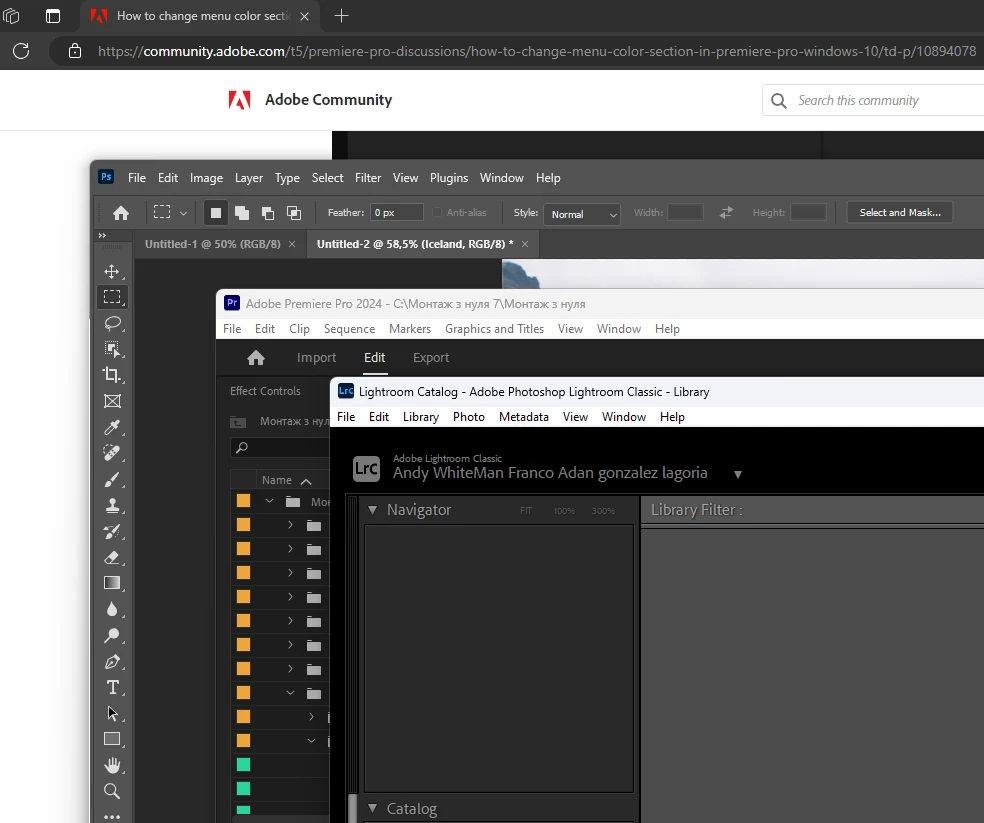
When using Premiere Pro in dark mode on Windows, the application’s title bar remains glaringly white. This disrupts the otherwise cohesive dark theme and creates unnecessary visual strain—especially in low-light environments.
🎨 Photoshop and Illustrator Handle This Better
Applications like Photoshop and Illustrator already support dark title bars that align with the rest of the UI. This makes the user experience more seamless and visually consistent. Premiere Pro, as part of the same Creative Cloud suite, should offer a similarly polished experience.
🛠️️ Why This Matters:
Visual Consistency: The bright white bar clashes with the rest of the dark interface.
User Comfort: Especially for editors working in dim lighting, the white title bar can be distracting and even cause eye strain.
Professional Look: A fully dark UI is not just aesthetic—it signals polish and attention to detail.
✅ Suggested Improvement:
Please add support for a dark-themed title bar in Premiere Pro, matching how it works in Photoshop and Illustrator. Ideally, this should integrate with Windows’ dark mode settings and/or Premiere's Appearance preferences.
Thank you for considering this request. A small UI change like this would greatly enhance the overall experience for many users.
Sincerely,
 AdChoices