


Known Participant
February 22, 2025
Open for Voting

The Out Point Is 1 Frame Ahead in MacOS and not WindowsOS
  • February 22, 2025
  • 3 replies
  • 237 views


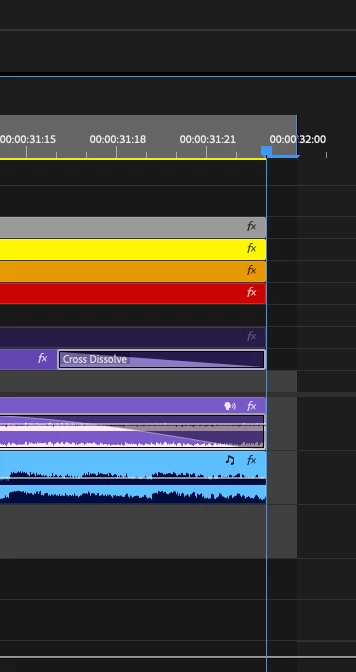
New switch to MacOS I've become frustrated with this. Not only is this incredibly annoying for exporting projects or selecting the appropriate length clips in the Source Window, using the "selected in/out points". This is a bygone era of film splicing. On Windows software machines the out-point is exactly where the out point is supposed to be, not one frame forward of the scrubber.

Also: If I Set Out Point in my Source window to drag a clip into my timeline, the footage portion of the clip is 1 frame forward of the audio portion,
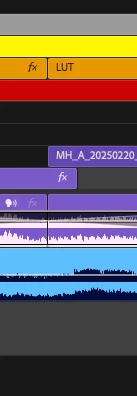
 

and disrupts my timeline organization.


This does not happen on Windows machines. I run a KVM and the exact project on my Windows machine produces a different result. If this is a cultural stake in the editing world, can we have a toggle to remove this extraneous frame in the Project Settings -> Timeline submenu for those of us that want to be more efficient?

3 replies

MyerPj
Community Expert
Community Expert
February 23, 2025

I guess it depends on what you are doing. If you are going there to place the next clip, then it's just right, at least on Windows. I try not to advocate when I'm here on the forum, doesn't mean I don't want too! 🙂

Known Participant
February 23, 2025

Never change! MacOS is not worth it. I can't deny the hardware but boy oh boy can I find new reasons to deny the software, every single day.

And yes, that is correct. The red arrow you've placed is pointing to the frame marker. I am requested that the in/out points be defined exactly on the trailhead/scrubhead/timeline blue line indicator, that frame instead since that is what most people colloquially define as the frame. This is not kosher, I know, but myself and everyone I work with says the same thing.

To be noticed by all, and then to have the workaround sentiment at the office as "my brain always has to remember to tap O, then left, then O." is pretty subpar in my opinion.

MyerPj
Community Expert
Community Expert
February 22, 2025

Windows only ever user here. Just to make sure we are talking about the same thing:

The arrow below points to the Frame Marker, ie: the frame in question.