
Participant
Nov 16, 2026 3:11 AM UTC
Open for Voting

Toggle to hide the Effects panel visual previews

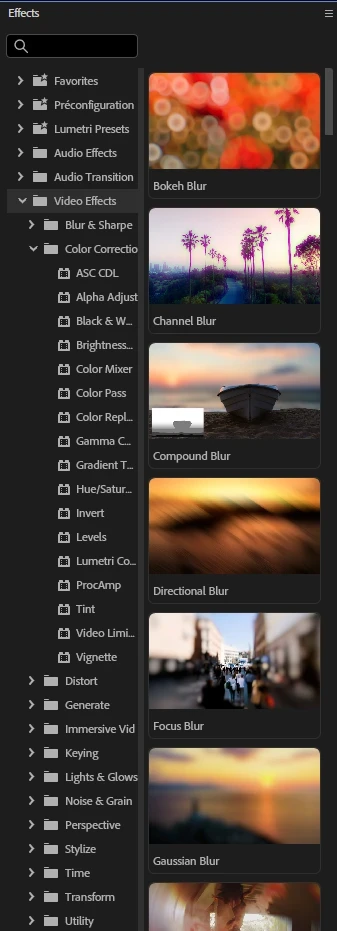
The Effects visual preview introduced in Premiere Pro 27.0 may be great for some people, but for others like me this is not. My Effects panel has always been relatively thin but large enough for the text to be visible.
But now the previews eat half the width of the panel and can barely be shrunk. At the minimum they still occupy half of the width of the panel and I now need to scroll horizontally to read the effect name, this is getting ridiculous.

These previews are forced to the user with no possibility to remove it and to have a clean, lean effect panel with just text.

Could it be possible to add a button or an option to hide them please ?


    7 replies

    JohnRael
    Known Participant
    Nov 18, 2026 9:20 AM UTC

    Seriously, every once in a while I need to look and see what an effect does, but after that I certainly don’t need to see it every single time I access it. This would be like having a dictionary definition next to every word I type. 

    Translate
    Participant
    Nov 17, 2026 4:27 AM UTC

    Please! Some of my presets consist of multiple effects applied in layers, which makes them quite resource-intensive. Every time I open the Effects panel or search for something, Premiere freezes for about 10 seconds while it renders the previews. A button to hide them would be excellent.

    Translate
    Abbottoklus
    Inspiring
    Nov 16, 2026 9:52 PM UTC

    Came here to make the same request. In my layout I already cut off the effects names for the most part with a very thin panel, so it hasn’t been a huge annoyance, but still noticeable enough and kind of distracting having this sliver of the thumbnail previews always visible. Definitely want this to be a toggle-able option.

    Would also love to be able to delete or hide the favourites bin. Or move it below presets. That one has actually annoyed me much more and I have zero use for it.

    Translate
    Participant
    Nov 16, 2026 8:50 PM UTC

    Yes please! The previews/thumbnails take up far too much space, and do not add value for an experienced editor.

    Translate
    R Neil Haugen
    Legend
    Nov 16, 2026 5:24 PM UTC

    I’m all in also. When checking for possible effects, the thumbs are very useful.

    But when you just wanna grab something you know they’re  blasted waste of space.

    Translate
    Everyone's mileage always varies ...
    Stan Jones
    Community Expert
    Community Expert
    Nov 16, 2026 3:25 PM UTC

    ​Upvoted. This is the best feature request to upvote. In another thread, I suggested the workaround of just ignoring them. If you don’t hover, they don’t animate. The left vs right space is adjustable, and the total width will be whatever panel group you have it in.

    Stan


    Translate
    Community Expert
    Nov 16, 2026 3:15 PM UTC

    Yes please! Or add an option for list view that will do just that, list effects in a list without any previews. When this feature was first talked about I think we all assumed a list view would be an option. 

    Translate