
Too Small of a Clickable Area When Trying to Drag Clips Along the Timeline
Version 24.5
There is a very small clickable area when trying to drag clips along the timeline. I like to quickly edit videos in Premiere Pro. Part of that is quickly grabbing and dragging clips around on the timeline. I feel like its getting more difficult to do this without slowing down and trying to click a precise spot on a clip. This is especially a problem when you work zoomed out on the timeline, like I prefer to. All this results in me undoing a accidental edits and trying to grab clips multiple times. It slows the process down a lot.
There a list of things that are in the way that accidently get clicked when I go to drag a clip now.
-Opacity Bar (for audio it's the gain bar)
-Fx Button
-Transition edges, postion, & length,
-Clip start and end positions,
-And Audio has all this, plus the Essential Sound Button.
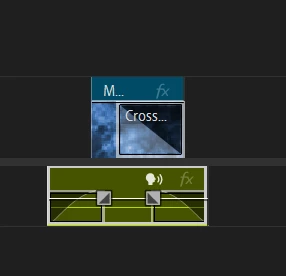
I'd like a way to try and toggle some of this stuff off. (if there is a way, I'm unaware of it) I don't need to adjust clip opacity using a bar on the clip, and I don't need a button to open the ES sound menu or Effect Control Menu on each clip. It would also be nice to increase the the area range where you can click to drag clips.


 AdChoices